

Miker2426
Inspiring
December 4, 2018
Question

Photoshop is altering the color of raw photos.
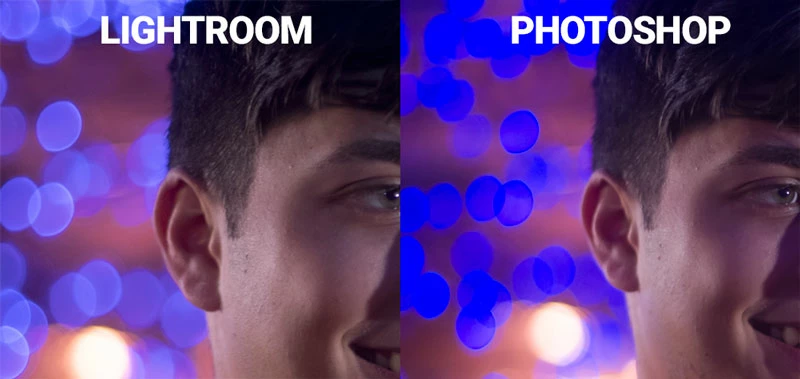
  • December 4, 2018
  • 3 replies
  • 3436 views

The above pics are screenshots taken from my iMac. The left images show what my raw photo looks like as displayed in Lightroom. If I open the same photo, either through "Edit In Photoshop" using Lightroom, or in Adobe Camera Raw, the colors shift in a pretty significant way, as shown on the right. It especially flattens out and color shifts the bokeh effect in the background. Oddly enough, if I preview the raw photos in Adobe Bridge, they look exactly like they do if opened in Photoshop.

I've tried playing around with different color profiles, both in Photoshop and my monitor. The problem does not go away.

I've had very good luck in this forum thus far, so I'm hoping my streak continues. Thanks in advance for any help or suggestions.

FWIW, I'm using an iMac 27" 2017, High Sierra 10.13.6. Photoshop is up to date.

3 replies

Participant
January 19, 2025

I had the same problem, and it mostly happens with pink, lilac, violet, and blue colors. Here's how I solved it: when Camera Raw opens, go to the Profile tab and select Browse.... By default, the Adobe Raw tab will be open — collapse it and open Camera Matching, then choose the same mode that was set on your camera. It worked!
So many years of frustration, and it turned out to be so simple.

raal_jhon
Participant
November 25, 2022

is this tread solved.?

D Fosse
Community Expert
Community Expert
December 4, 2018

You need to update Lightroom to the current version, which is now 8.0. Don't assume you have "the latest" - sometimes the CC app fails to report available updates.

The problem is that new camera profiles were introduced a while ago, with a completely new default. When you "edit in" Photoshop, the file is actually opened silently by ACR using the Lightroom settings. But if it applies a different camera profile you get this. The new profiles generally have more contrast and saturation.

Miker2426
Miker2426Author
Inspiring
December 4, 2018

Hi @D Fosse. Thanks for taking the time to reply.... much appreciated!

I double checked my updates, because I read about the new profiles (I'm pretty sure it was you I read!). My Lightroom is indeed 8.0, my Camera Raw is 11.0 and Photoshop is 20.0.1.

Is only the older version of Lightroom or Photoshop/ACR applying different camera profiles? Is there any way I can check to see if my current version of Photoshop/ACR is applying these camera profiles?

EDIT: I ran the Color Synch Utility on my iMac - Profile First Aid and got the following results. I'm curious if these are the camera profiles mentioned. Would these be worth the effort of repairing?

D Fosse
Community Expert
Community Expert
December 4, 2018

Ah, OK...so it wasn't the easy solution...

I see there's a DCI P3 profile in there, which means you have a new iMac with a wide gamut display. So the next logical possibility is that either ACR or Photoshop isn't using the correct display profile.

Do you have more than one display?

Never "play around" with profiles. It has to be the correct one, this isn't optional. A profile is a description of a color space, and the description has to be accurate, or it won't work as intended. Your monitor profile has to be a correct description of your display's characteristics.

Are you using a calibrator to make your profiles, or are you just using the generic system profile?