
jesusb54480542
Participant
March 5, 2025
Question

Photoshop is not selecting background when Content Aware fill

  • March 5, 2025
  • 2 replies
  • 161 views

Hello,


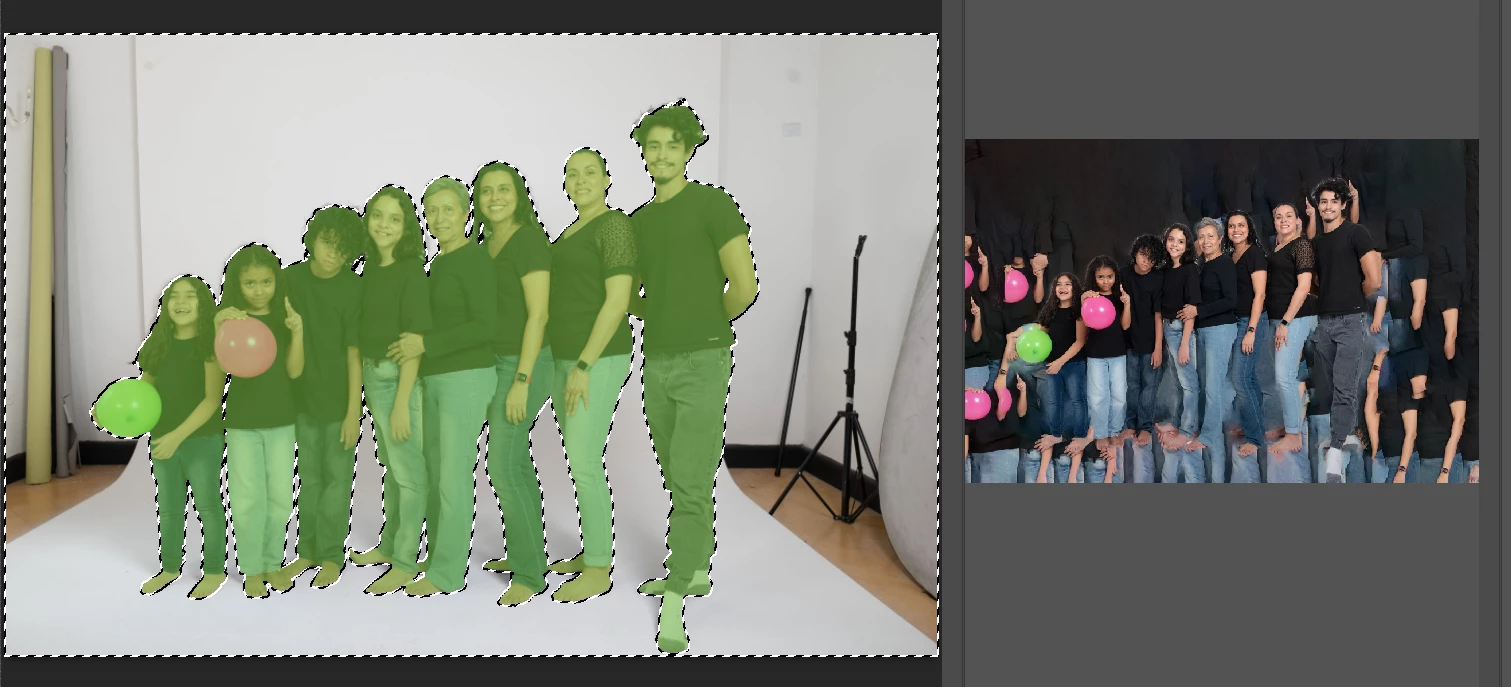
I am trying to extend the background of this image, but when i select the background, Photoshop does not recognize that i have selected the background, instead it selects the subject, as shown in the screenshot. I am using the latest version of the program. Adobe Photoshop Version: 26.4.1 20250225.r.194 4c5f14b x64. It's the first time this has happened to me.


Any ideas or suggestions?


Thank you
2 replies

Trevor.Dennis
Community Expert
Community Expert
March 5, 2025

When you say 'extend the background' do mean making the canvas size larger and extending the current background into the extra space?  If yes, then the Crop tool with Generative Expand might be a better fit.


If not, then a more detailed description of what you are trying to achieve would be helpful.  Include screen shots if you think it will help.

D Fosse
Community Expert
Community Expert
March 5, 2025

Content aware fill creates content based on what is not selected. So this is entirely expected.


What you need to do here is make a mask on this layer. Then bring in whatever background you want, created by whatever means you want. Put that under the people layer.


(and then of course, finish up by adding the proper shadows. In this case you can keep the shadows on the base).