
dpisdd85127488
Inspiring
February 27, 2017
Answered

Photoshop is scaling my Prints up without my permission?

  • February 27, 2017
  • 2 replies
  • 1282 views

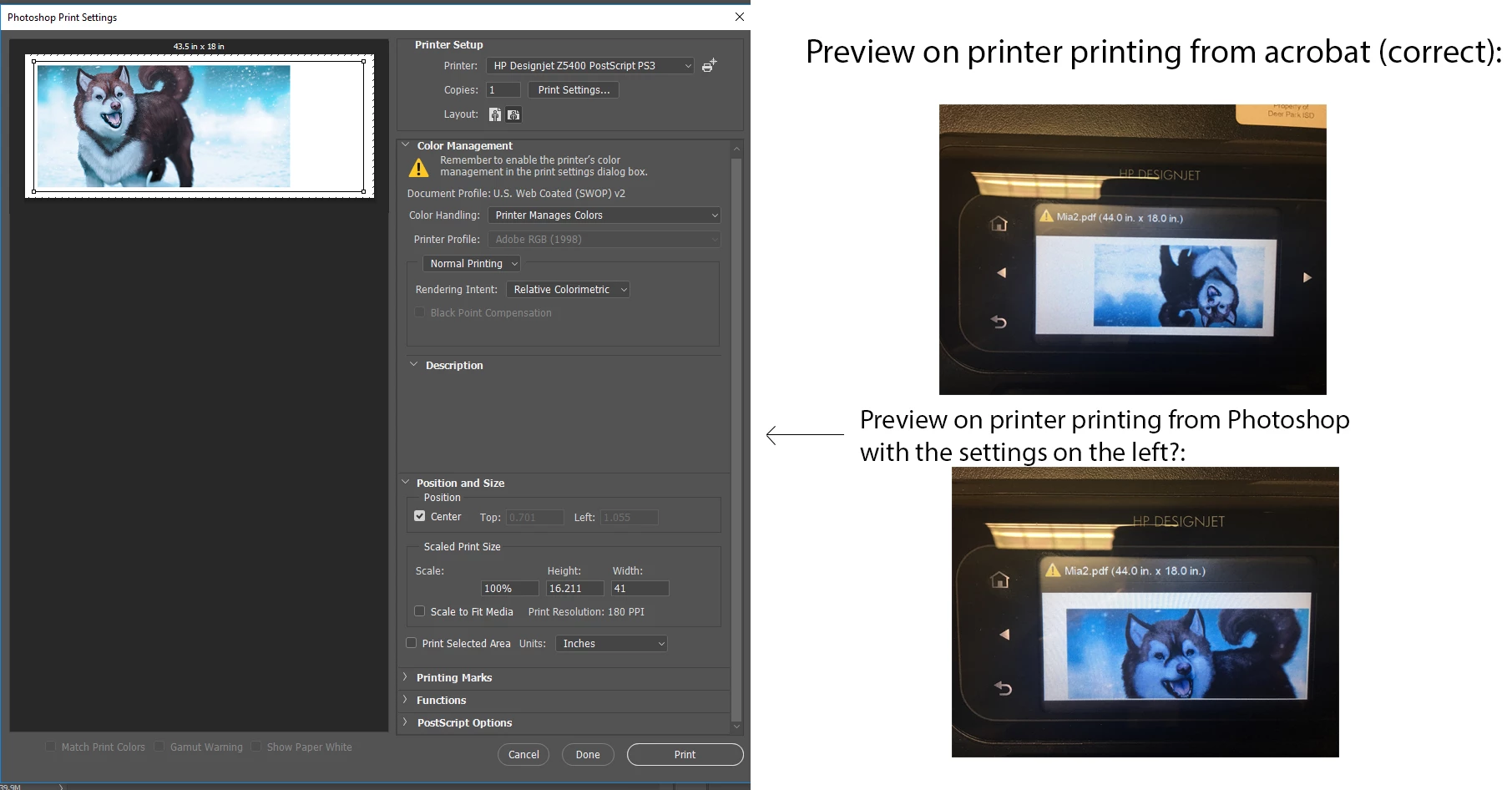
I try to print from Photoshop cc 2017 to HP Z5400 (everything updated, reinstalled, etc.) and Photoshop is deciding to rezie my print. In my case it is scaling the final print up. For instance look at the images I am providing and keep in mind that scale to fit and all of that is turned off everywhere I could possibly find it. I know it is a Photoshop to printer issue because if I save my Photoshop file as a PDF and print from acrobat it works fine. I understand the sane thing to reply back with is just print from Acrobat but why is this happening? The exact same file is printing differently depending on if it was printed from Acrobat as PDF or from Photoshop as PDF. Photoshop is rescaling every type of file...not just PDF. I thought I would show this example because it is obvious there is something going on when printing from Photoshop. Can someone please enlighten me as to why this is happening? I need to print from Photoshop but I can't because my prints are being rescaled?
    This topic has been closed for replies.
    Correct answer dpisdd85127488

    I'm guessing it is an issue with the printer driver communicating with PS. I am going to reinstall Photoshop again and see if it changes. It seems like HP has been giving others problems in this area.


    It looks like another reinstall of Photoshop has done the trick for now. I did try to just do a CTRL+ALT+SHIFT reset with no luck but the clean install has seemed to fix the communication with the printer driver somehow. All is back to normal for now.

    2 replies

    JJMack
    Community Expert
    Community Expert
    February 27, 2017

    Can you show us the image in image size dialog? The Print dialog shows that image is not being scaled it shows 100% that the width is 41" inches and the height is 16.211 inches  that the paper being printed on is 43.5" wide and 18" high there is some unprintable area . The image being printed fits within the printable area and the preview show the image has small white borders on the top left and bottom and a large white border on the right.

    JJMack
    dpisdd85127488
    Inspiring
    February 27, 2017

    dpisdd85127488
    Inspiring
    February 27, 2017

    The green box below somehow is part of the culprit. Still seems like I have to save as a PDF and open in Acrobat and print from there. Its a mess and I'm not sure if its PS or HP.

    dpisdd85127488
    Inspiring
    February 27, 2017

    I'm thinking the problem comes from the difference between Rendering Resolution ppi and Printing Resolution dpi.....The Rendering Resolution has two settings 300 and 600. The Printing Resolution is set at 1200 x 1200. The image I'm printing is 180 ppi. Anyone have any advice? I have never run into this problem before and I'm starting to think there is some sort of communication error between PS and the printer.