
Participant
November 13, 2019
Question

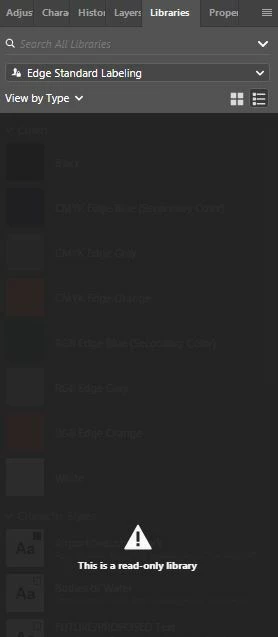
Photoshop issue Libraries has become Read Only

  • November 13, 2019
  • 1 reply
  • 4898 views

My photoshop library quits working shortly after I've opened photoshop. I've tried a number of things to fix the issue including: closing out & reopening photoshop, being sent new access to the library I'm using, restarting my computer, updating photoshop, & updating my computer. Please let me know if you have any ideas on how I might fix this problem.


{Thread renamed by moderator}

This topic has been closed for replies.

1 reply

Sahil.Chawla
Adobe Employee
Adobe Employee
November 13, 2019

Hi Natalie,

As the library has become read only, have you tried closing Photoshop, then sign out of the Creative Cloud app and sign back in, then launch Photoshop and see if it works?

Regards,
Sahil

Participant
November 13, 2019

Yes, I've tried that. Once I log back into the adobe library & open photoshop, the library appears to work but only for a few minutes and then I get the same error message.