
Participant
May 8, 2017
Answered

Photoshop JS Script that displays RGB values on text layer.

  • May 8, 2017
  • 1 reply
  • 2378 views

How would I write a JS that changes the text layer to display the current RGB value of a different layer and updates when that layer color is changed?

So if I were to change the fill color of a shape object it the script read that RGB value and display it as a on the text layer.
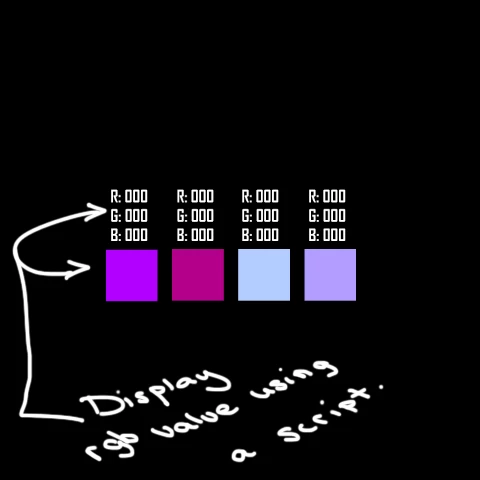
This is what I have so far. It selects the layer, I can change the color but now I need it to also display the RGB values on the separate text layer.

dlg.color1Btn.onClick = function(){

        app.activeDocument.activeLayer = app.activeDocument.layerSets.getByName("Colors").artLayers.getByName("1");

        app.activeDocument.selection.selectAll();

        getColor();

        app.activeDocument.selection.fill(foregroundColor , undefined, undefined, true);

        app.activeDocument.selection.deselect();

        app.refresh();

        }

function getColor(){  showColorPicker()  }

This topic has been closed for replies.
Correct answer Chuck Uebele

You can get the target the layer associated with the color of the box and change the text value like the below script. Of course you can put this all in a function, and format the output to show three digits by changing it to a string and doing some other code.

#target photoshop

var doc = activeDocument;

var txtLayer = doc.layers.getByName('box 1');

doc.activeLayer = txtLayer

txtLayer.textItem.contents = 'Red: '+  parseInt( foregroundColor.rgb.red) + '\rGreen: ' + parseInt(foregroundColor.rgb.green) +  '\rBlue: ' + parseInt(foregroundColor.rgb.blue)

1 reply

Chuck Uebele
Community Expert
Chuck UebeleCommunity ExpertCorrect answer
Community Expert
May 8, 2017

You can get the target the layer associated with the color of the box and change the text value like the below script. Of course you can put this all in a function, and format the output to show three digits by changing it to a string and doing some other code.

#target photoshop

var doc = activeDocument;

var txtLayer = doc.layers.getByName('box 1');

doc.activeLayer = txtLayer

txtLayer.textItem.contents = 'Red: '+  parseInt( foregroundColor.rgb.red) + '\rGreen: ' + parseInt(foregroundColor.rgb.green) +  '\rBlue: ' + parseInt(foregroundColor.rgb.blue)

Participant
May 8, 2017

Thank you, this worked perfectly.

Familier with Photoshop
Participant
December 19, 2023

How can i use it please menson?