



Kelli Jae Baeli
Inspiring
August 17, 2026
Answered

photoshop keeps changing my image size settings

  • August 17, 2026
  • 13 replies
  • 70 views

I’ve been publishing for over thirty years and never had this issue. KDP demands exact dimensions for book covers, but recently, I am unable to resize images to fit those dimesions. I realize Photoshop uses pixels, but in publishing, you have to use inches. When i go to image size and deselect the resampling, as advised, and then insert my proper dimensions, Photoshop changes those dimesions so that the cover size is incorrect.

I’ve tried checking and unchecking resample.

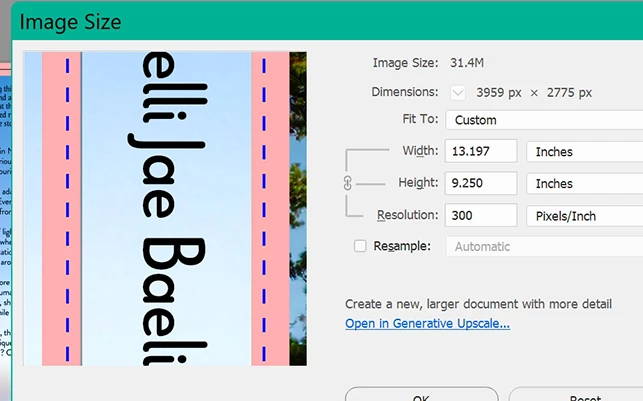
I’ve tried starting over with a new template of the size needed, and it still won’t let me decide what size I need. The correct width and height is 13.198 x 9.25. When i can make those changes and save it, then open it back up, Photoshop has changed one or the other setting. The settings have to be exact, so without a solution to this, i can’t upload book covers.

 

Correct answer davescm

This is simple. Photoshop works in pixels - there are no half pixels or quarter pixels, or any other fractions of pixels, just whole pixels.

At 300 ppi i.e. 300 pixels per inch, 13.198 x 9.25 inches translates to 3959.4 x 2775 pixels. As already stated, there cannot be any fractions of a pixel so the 3959.4 is rounded down to 3959 pixels. This makes the Photoshop document 3959 x 2775 pixels. At 300 ppi that is 13.197 x 9.25 inches. That is why you see that change of one thousandth of an inch.

The best way round this is to use an application such as InDesign which works in inches and drop the image into that document. Then output a PDF from there. You are not going to see the one thousandth of an inch difference.

Dave

13 replies

Kelli Jae Baeli
Inspiring
August 19, 2026

if it’s so simple, then why haven't you been able to provide a workable solution? I’m really weary of all you guys talking down to women.

Kelli Jae Baeli
Inspiring
August 19, 2026

Wow. Are you guys always this condescending? Are you being sexist with all this mansplaining, or are you this rude and condescending to everyone?
 

You insist on using a straw man argument. You keep explaining that Photoshop uses pixels, and covers use inches, and the two don’t always work well together. I KNOW THAT. 

The ID solution DID NOT WORK, by the way. The cover was still wrong after it was sized properly in ID. I checked it OUTSIDE Photoshop.

I do the work of five or ten people, and I must be able to integrate efficiency in my workflow. I understand how Photoshop works and why. That still doesn’t solve the problem and my workflow would be horribly compromised by having to use ID for covers. I shouldn't have to. Since 37 years of this has never revealed this problem over HUNDREDS of covers, I stand by my assessment that there is something weird going on. And moreover, it DOES NOT SOLVE THE PROBLEM in any efficient way.  Maybe if you understood that other people have experience and expertise and treat them accordingly, the world would be a better place.

I won't be coming here for answers anymore. There’s a tendency for men here to treat women like idiots.

davescm
Community Expert
Community Expert
August 19, 2026


The ID solution DID NOT WORK, by the way. The cover was still wrong after it was sized properly in ID. I checked it OUTSIDE Photoshop.

Please give me the exact size of the front cover, back cover, spine, margins and bleed. I will set a sample up here in InDesign, export it and check it ( including printing it). I use InDesign to set up books and covers. My daughter, an illustrator, also uses InDesign for books and covers, including publishing on KDP. Neither of us has seen an issue in exporting so far - however, I am happy to check it using your exact dimensions, to see if I can replicate the problem here using those dimensions.

Dave

Kelli Jae Baeli
Inspiring
August 17, 2026

To whom it may concern, reading this: I have an 80/20 rule: I do 20% work to get 80% results, not the other way around. for a solid month, I’ve been fighting these glitches in KDP, and I’m not the only one. Other forums and communities are full of folks dealing with the same thing. There IS A PROBLEM WITH KDP. ANd I can’t keep fighting a losing battle, I have too much to do. I already do the work of five or ten people in this regard, and I just can’t keep throwing away all my time for this. I’ve decided to give up on trying to upload my print-version updates for my entire catalog, and instead focus on the digital versions and updating those and creating the print versions secondarily in the hopes i can upload them all later. 

Kelli Jae Baeli
Inspiring
August 17, 2026

well thanks for your input. It’s simply not going to work, then. I will have to find out why the KDP size is not compatible with Photoshop suddenly. I don’t understand why I’ve never run into this issue before. Usually, if the pixel size doesn’t match the inches to specification, i can adjust it using resolution tweaks, and unlocking the width and height. Now, that seems impossible. What a pain.

Kelli Jae Baeli
Inspiring
August 17, 2026

i tired the ID method, (even though it would add about 30 more steps just to complete a cover) and created new document sized to fit the exact dimensions. I imported the pdf of the cover, exported it out as pdf, opened it in Photoshop to check the size and it was wrong again. When i tried to resize in Photoshop, same issue.

D Fosse
Community Expert
Community Expert
August 18, 2026

@Kelli Jae Baeli 

This was fully explained by ​@davescm and you should read those posts again. This is a matter of rounding to whole pixel numbers. If you’ve never encountered it before, it because you haven’t hit upon measurements where this rounding had to happen.


BTW, InDesign is the industry standard in print publishing for a lot of reasons, and this is just one of them. Others are vector text, overprinting etc, things that a pixel editor generally is not equipped to do.

Kelli Jae Baeli
Inspiring
August 17, 2026

Why, then, in all these years, has this never happened before? I do my covers in Photoshop, and having to do some of them in this workaaround in ID would be cumbersome to say the least. (I do the INTERIOR files in ID). I’m trying to figure out why the cover size that KDP demands is suddenly not an option for resizing in Photoshop, when there were bound to be other covers that didn’t have acceptable measurements...and when i set my preferences to use INCHES, why does it even default to pixels? This is so frustrating.

Also, how do i “drop” the image of an entire wrap around cover into an ID document? I’ve only ever used ID for the interior files, and used only small in-text images there. Is it a seperate document, and the size of it on screen doesn’t matter? The cover is in layers, so should i flatten the entire thing, or pdf it and import that to ID?

davescm
Community Expert
Community Expert
August 17, 2026

It is not a case that Photoshop defaults to pixels, rather it is a pixel editor and works in pixels. Every other unit is based on converting those pixels into other units based on ppi or ppcm. This is not new, it has always worked this way. In your example, if you want to use Photoshop, your choice for width is 3959 pixels, which at 300ppi is 13.197 inches or 3960 pixels which is 13.2 inches.

In InDesign you create a new document based on your required measurements. It becomes a single spread with three pages back, spine and front. There are several on-line tutorials on how to do this, I’ve linked one example : 


Once you have your doc set up, you can place your cover image onto it.

Dave
 

davescm
Community Expert
davescmCommunity ExpertCorrect answer
Community Expert
August 17, 2026

This is simple. Photoshop works in pixels - there are no half pixels or quarter pixels, or any other fractions of pixels, just whole pixels.

At 300 ppi i.e. 300 pixels per inch, 13.198 x 9.25 inches translates to 3959.4 x 2775 pixels. As already stated, there cannot be any fractions of a pixel so the 3959.4 is rounded down to 3959 pixels. This makes the Photoshop document 3959 x 2775 pixels. At 300 ppi that is 13.197 x 9.25 inches. That is why you see that change of one thousandth of an inch.

The best way round this is to use an application such as InDesign which works in inches and drop the image into that document. Then output a PDF from there. You are not going to see the one thousandth of an inch difference.

Dave