

Paloma36868318ilub
Participant
May 31, 2026
Answered

photoshop keeps crashin, refusing to select tools and user commands.

  • May 31, 2026
  • 1 reply
  • 44 views

Quite expensive for such a program! that crash every day, delaying my work as much assomeones sanity can handle. every day I have to close and open at least about 5 to 10 times each session to reset photshop. Dont accpt keyboard shorcuts, or when tools selects it keep selecting something else, not responding to command on layer.
    Correct answer D Fosse

    Crashing is almost always caused by a GPU problem. Please post the full Help > System Info from Photoshop. This lists the complete GPU configuration among other things.


    The other problems sound like corrupt preferences, which usually looks like application bugs and are usually mistaken for that. Preferences are vulnerable to corruption because they are rewritten on every application exit - and with all the crashing going on, corruption is very likely to happen.


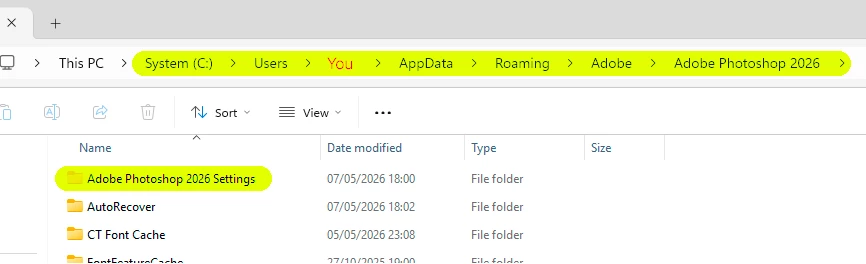
    The safest and most complete way to reset preferences is to move this entire folder to your desktop, so a fresh one can be rebuilt:


    Make sure to first save out your custom actions and brushes so they can be reloaded after the reset.


    1 reply

    D Fosse
    Community Expert
    D FosseCommunity ExpertCorrect answer
    Community Expert
    May 31, 2026

    Crashing is almost always caused by a GPU problem. Please post the full Help > System Info from Photoshop. This lists the complete GPU configuration among other things.


    The other problems sound like corrupt preferences, which usually looks like application bugs and are usually mistaken for that. Preferences are vulnerable to corruption because they are rewritten on every application exit - and with all the crashing going on, corruption is very likely to happen.


    The safest and most complete way to reset preferences is to move this entire folder to your desktop, so a fresh one can be rebuilt:


    Make sure to first save out your custom actions and brushes so they can be reloaded after the reset.