Participant
November 5, 2023
Answered

Photoshop loses focus when clicking tools

  • November 5, 2023
  • 1 reply
  • 152 views

Hi, 

I am trying to use Photoshop 25.1 on Mac OS 14.1. Everytime I click any tool the application loses focus. I basically can not edit anything. This is a new occurence since the latest update. 

I made a short screen capture to demonstrate. Does anyone have an idea?

Thanks


This topic has been closed for replies.
Correct answer keitgen

This is apparently a known bug - for anyone looking I found a work-

around:


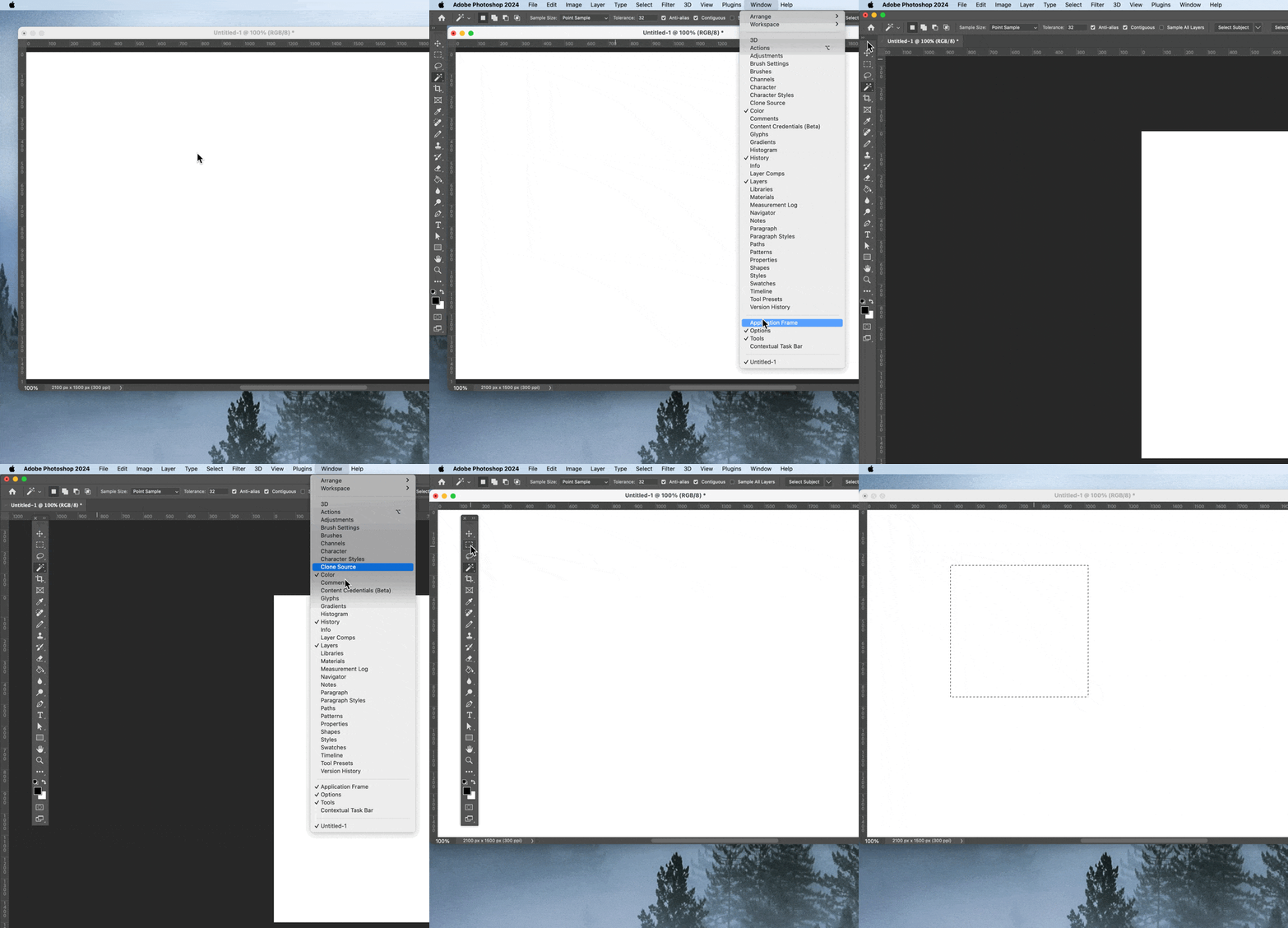
First Select Window Menu and show the Application Frame.


Then you can de-dock the Tool bar and remove the Application Frame again. 


Here a short screen capture. 
1 reply

keitgenAuthorCorrect answer
Participant
November 5, 2023

This is apparently a known bug - for anyone looking I found a work-

around:


First Select Window Menu and show the Application Frame.


Then you can de-dock the Tool bar and remove the Application Frame again. 


Here a short screen capture.
