



twindeknecht
Participant
Jun 25, 2022 6:02 PM UTC
Answered

Photoshop not detecting copy/paste image size by default

On Photoshop v24.3.1, whenever I copy an image (from Chrome web browser) and go to paste it into Photoshop, it is not detecting the image size. Normally, when you copy and image, Photoshop will automatically detect the image size (pixels), and when you create a new image: File > New and paste the image, it will paste the actual image size from the clipboard.


Right now, it is using the last image size or custom image size, but not the "clipboard" size of the image.

This topic is closed to new replies. Start a new post to keep the conversation going.
J E L
J E LCorrect answer
Community Expert
Jun 25, 2022 6:48 PM UTC

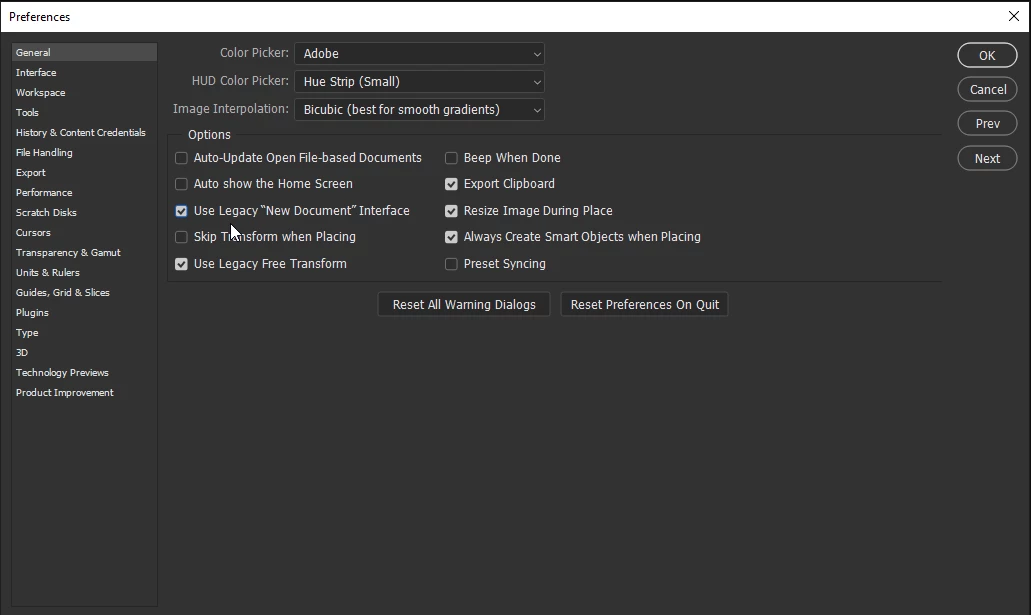
Hi @twindeknecht, Please try checking Use Legacy "New Document" Interface in Preferences on the General tab. Is it working now? Let us know.


32 replies

cauthier721
Participating Frequently
Jun 26, 2022 3:06 PM UTC

Me too! Thanks, fixed! 😄

Translate
anniee94382827
Participant
Jun 26, 2022 11:58 AM UTC

Thank you so much!!  This fixed it for me.  I too had this issue after that latest update.  Now works like a charm. Brilliant. Thx

Translate
twindeknecht
Participant
Jun 25, 2022 7:47 PM UTC

Hi @J E L, yes this did fix the issue! Thank you.

I wonder what changed in the latest update though? I previously was using the current New Document interface and was able to paste from clipboard.

Translate
Participating Frequently
Jul 21, 2022 6:20 PM UTC

yeah exactly, who could possibly want an incorrect clipboard-sized doc?

Translate
Jojakeem
Known Participant
Jul 25, 2022 8:41 PM UTC

Indeed! It's things like this that messes up a workflow that millions of users must have used every day. I really wonder how developers got to a point to think that changing this culd be a step forward.

Translate
J E L
Community Expert
J E LCommunity ExpertCorrect answer
Community Expert
Jun 25, 2022 6:48 PM UTC

Hi @twindeknecht, Please try checking Use Legacy "New Document" Interface in Preferences on the General tab. Is it working now? Let us know.


Translate
Participant
Jul 2, 2022 4:13 AM UTC

Thank you so much. It was making me crazy. Checking legacy "New Doc" solved the problem.

Translate