



Ervins G.
Known Participant
April 25, 2023
Question

Photoshop on Asus ProArt 16 (2022 model)

  • April 25, 2023
  • 2 replies
  • 3130 views

I am confused.
I own an Asus ProArt Studiobook laptop. Specs are well above average: 64GB RAM, 3070Ti GPU, 12th Gen i9 processor... But, my experience with running Photoshop on this device is worse than when I do exactly the same tasks on my 5-year-old Lenovo with a 2060 GPU and i7 processor. It's been almost half a year, and I still haven't managed to run Photoshop anything near the level I expect it to run on this device, given the specs. I wonder if there is any single person with an Asus ProArt laptop that can confirm enjoying a smooth Photoshop experience? I am starting to think, maybe the combination of integrated i9 GPU (that CANNOT BE DISABLED in the device manager) and GPU is something that Photoshop doesn't get. It often feels that Photoshop is not even using GPU (although it is enabled in Preferences) and in the end, I get a pretty similar Photoshopping experience as on my Surface Microsoft Surface, i7 model with integrated Intel GPU. In a .psd file that weighs under 10 MB, even switching layers on and off, takes an extra second or two. Not even mention using selection tools which may take 10+ seconds to respond). I find this experience pathetic.

- My ASUS is running on Windows 11;
- PremirePro and Illustrator work all right; I don't have any major complaints;

- Blender (3D software) runs like a charm;

- I always run the latest Photoshop version.
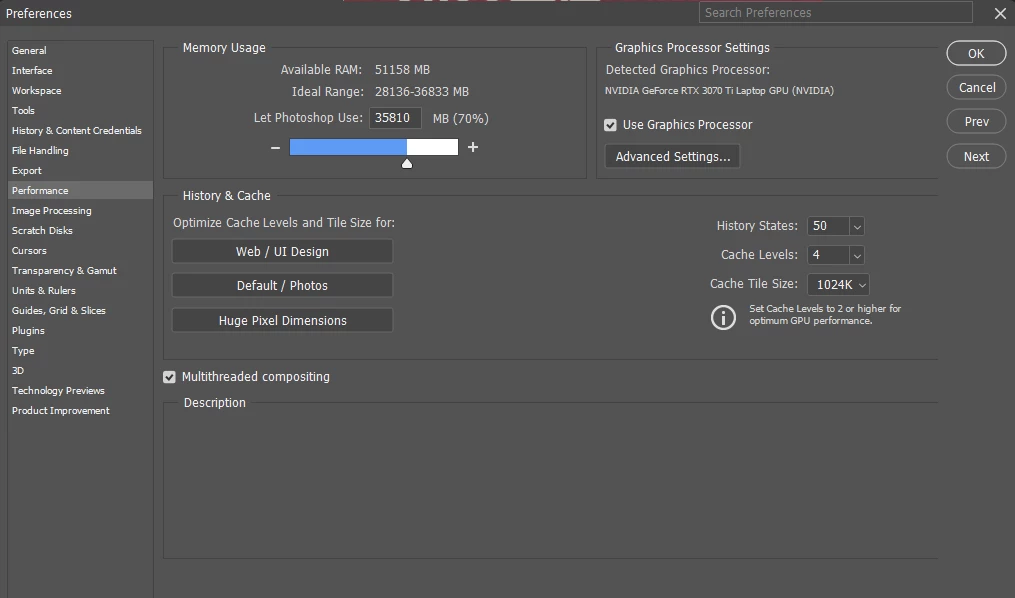
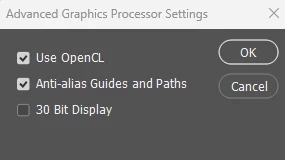
What am I missing?

This topic has been closed for replies.

2 replies

Bojan Živković11378569
Community Expert
Community Expert
April 25, 2023

Have you tried to manage through System > Display > Graphics > Photoshop > Options > Select an option?


Ervins G.
Ervins G.Author
Known Participant
April 25, 2023

Thanks for the tip! I just checked and turns out that I actually haven't done that. I just 'threw' all Adobe programs there and set 'high performance'. Just in case. Yet, it doesn't feel doing any better. Both with iGPU disabled and re-enabled. When iGPU is disabled, Photoshop warns me about 'outdated' drivers (which cannot be true) and disables OpenGL.

When iGPU is back enabled, no errors, yet I don't feel any difference in performance (I'm testing on a ~70 MB .psd file, no filters applied, just images and masks; it is still slow).
I haven't restarted my PC, however. Maybe I should. To 'help' Windows with enforcing newly applied settings.


D Fosse
Community Expert
Community Expert
April 25, 2023
quote

I am starting to think, maybe the combination of integrated i9 GPU (that CANNOT BE DISABLED in the device manager) and GPU is something that Photoshop doesn't get.

What am I missing?


By @Ervins G.


You're not missing anything. Dual GPUs is a well known and well published problem with laptops.


There has to be some way to disable it. See section 6 and 7 here:

https://helpx.adobe.com/photoshop/kb/troubleshoot-gpu-graphics-card.html 

Ervins G.
Ervins G.Author
Known Participant
April 25, 2023

Unfortunately, I got multiple affirmations from various sources, that on this particular device, BIOS is 'locked' and doesn't allow running this PC without iGPU. If I 'disable' it in Device Manager, it is still running. Strangely enough, the PS brutally ignores my Nvidia settings and even when iGPU is 'disabled' (which it isn't), ignores dedicated GPU and throws 'old driver' errors at me, which cannot be right. Here are a few more screenshots:
1.  iGPU "disabled"

2. Photoshop tells me this:

And that is not true... iGPU is somehow brutally 'baked in' by ASUS. I cannot access iGPU settings even when I enter the BIOS. If I knew that this ProArt 16 laptop is so 'locked' and doesn't allow me to adjust settings, I'd never buy it... But here I am.
3. And yes, I have adjusted my Nvidia settings, too (referring to the article):