
Participant
January 24, 2025
Question

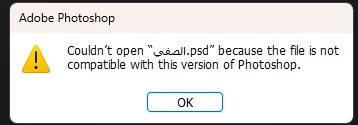
Photoshop opening file problem

  • January 24, 2025
  • 1 reply
  • 99 views

After I saved the file yesterday, I try to open it again and this message appears, download an older version that is compatible with the same version of the file before the update (26.0) , but to no avail, and I installed the latest version, but to no avail. Have you encountered this problem and found a solution?
1 reply

D Fosse
Community Expert
Community Expert
January 24, 2025

Most likely file corruption. Are you saving directly to an external drive or over a network connection?

waad_2098Author
Participant
January 24, 2025

I saved directly on our PC internal hard drive it make a crash before saving

D Fosse
Community Expert
Community Expert
January 24, 2025
quote

crash before saving


By @waad_2098


OK, that's it. It's corrupt.


Have you opened Photoshop since the crash? If crash recovery worked as it should, Photoshop should reopen with a recovered version. If you closed that out again, it's gone.


Other than that, you could try to open it in Illustrator or Lightroom, but chances aren't good.