

Sherleen Surya
Participant
May 26, 2026
Question

Photoshop Plugin still shows “Compatible app required” despite lowering minimum version requirement

  • May 26, 2026
  • 3 replies
  • 35 views


Hi everyone,

I’m investigating a compatibility issue affecting my Photoshop plugin, Lipika.

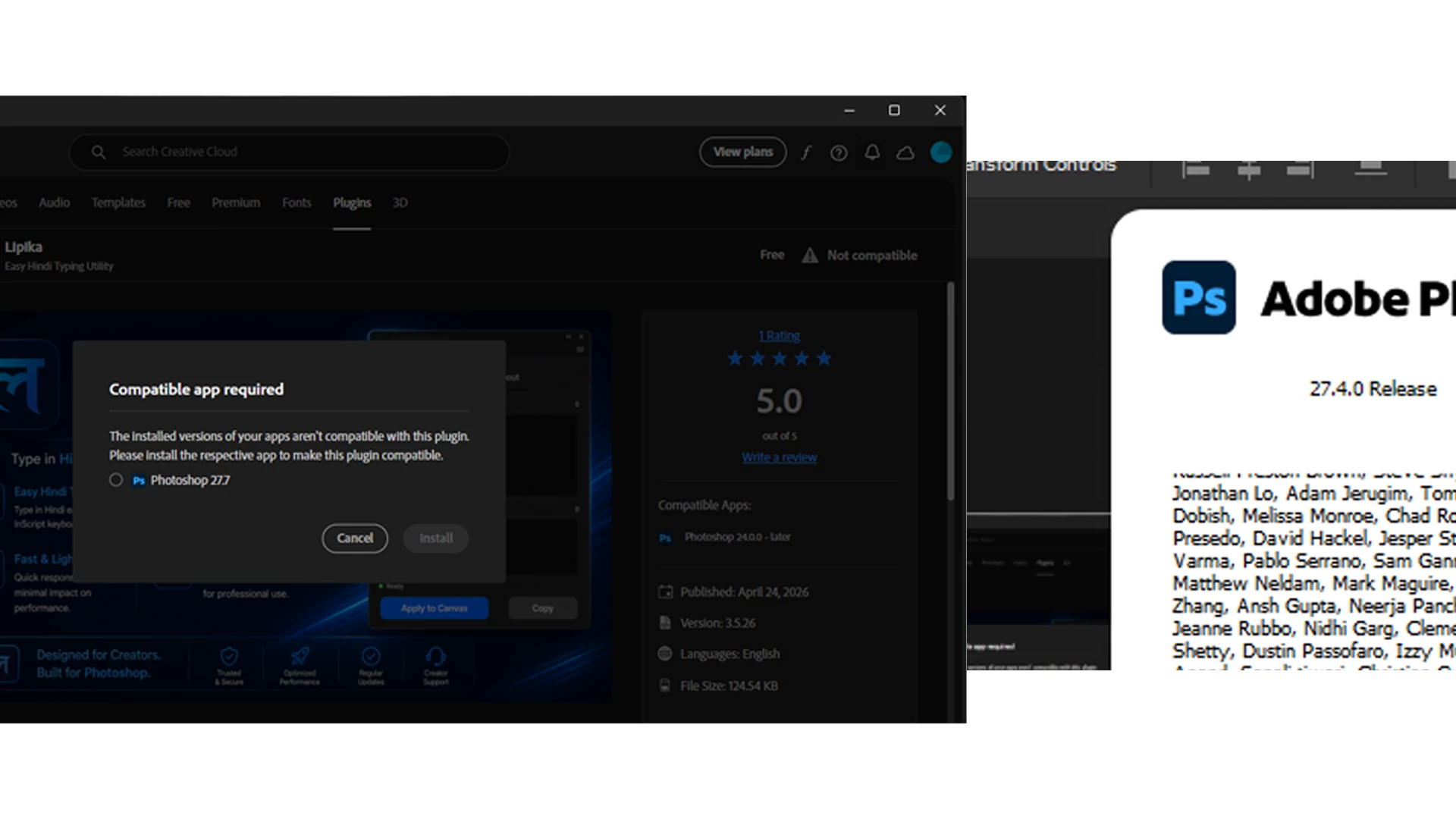
Users reported receiving “Compatible app required” in Creative Cloud Desktop even when their installed Photoshop version appears to meet the declared requirements.

To address this, I republished the plugin and reduced the minimum supported version:

• Previous minimum version: Photoshop 24.2.0+
• Updated minimum version: Photoshop 24.0.0+

Goal: Support Photoshop 24.0.0 and newer (including latest releases).

However, the issue still persists.

Current environment:
• Plugin: Lipika (latest published version)
• Installed Photoshop: 27.4.0 Release
• Manifest host.minVersion: 24.0.0
• Creative Cloud Desktop still shows “Compatible app required” and suggests installing a newer Photoshop version.

I’ve attached:
• Compatibility error screenshot
• Installed Photoshop version screenshot
• Manifest configuration screenshot

Questions:

  1. Does Creative Cloud Desktop cache compatibility data after publishing updates?

  2. Is compatibility determined by Marketplace settings, CCX package metadata, or both?

  3. Is there a way to inspect the final compatibility metadata Adobe reads after publication?

  4. Could Creative Cloud Desktop or UPIC still be using older package data?

  5. Are there known cases where Photoshop version detection fails?

  6. What is the recommended way to validate compatibility before release?

I can provide the CCX package, manifest, screenshots, and reproduction steps if needed.

Thanks for any guidance.
 

    3 replies

    ErinF
    Community Manager
    Community Manager
    June 26, 2026

    I have heard some complaints that “Compatible app required” is sometimes displayed when more information is necessary… here are some different cases that may or may not apply:

    • Make sure you launch the host app at least once before installing the plugin (this is more common in Premiere than Photoshop).
    • If Photoshop is not installed in the expected place on the boot drive - e.g., Photoshop is installed on an external drive - then CCX plugins aren’t supported.
    • Photoshop doesn’t currently support CCX installs on WinARM devices.

    For next steps, I would recommend attempting to install the plugin using the command line tool, as sometimes this produces a more precise error code: https://helpx.adobe.com/creative-cloud/apps/integration-with-other-apps/manage-plugins/install-plugins-using-upia-tool.html 


    In some apps you can change the CCX file to a ZIP and unload the contents into the expected user directory:

    • Windows: C:\Users\<USERNAME>\AppData\Roaming\Adobe\UXP\Plugins
    • macOS: ~/Users/<username>/Library/Application Support/Adobe/UXP/Plugins

    This isn’t recommended, but it is, in some cases, possible (I don’t think it works on Photoshop for WinARM).


    I can’t personally answer each of your questions 1 to 6. However, I can say that sometimes the following database files fail to update, which touches on your questions:


    macOS:/Users/<user>/Library/Application\ Support/Adobe/ UPI/Configuration\DB/UPI.db
    macOS:/Library/Application\ Support/Adobe/UPI/Configuration/DB/UPISys.db

    Windows: C:\Users\<user>\AppData\Roaming\Adobe\UPI\Configuration\DB\UPI.db
    Windows:C:\ProgramData\Adobe\UPI\Configuration\DB\UPISys.db


    The most comprehensive public guide to CCX installation failure is here: https://gregbenzphotography.com/installing-a-uxp-panel-from-ccx


    Plugin developers can reach out to ccintrev@adobe.com for support, and end users can reach out to asupport@adobe.com for installation help.


    davescm
    Community Expert
    Community Expert
    May 26, 2026

    Duplicate thread : please see this thread 

    I’ll close this one so that all replies are together in the other.

    Dave

    Sherleen Surya
    Participant
    May 26, 2026

    Title: Photoshop Plugin still shows “Compatible app required” after lowering minimum version requirement (24.2.0 → 24.0.0)

     Hi everyone,  I’m looking for help investigating an unresolved compatibility issue affecting my Photoshop plugin Lipika.

     Users previously reported receiving “Compatible app required” inside Creative Cloud Desktop even though their installed Photoshop version appeared to meet the declared compatibility requirements.

     To address this, I updated and republished the plugin with a lower minimum supported version:  * Previous minimum requirement: Photoshop 24.2.0+ Updated minimum requirement: Photoshop 24.0.0+

      My intention is for the plugin to support **Photoshop version 24 and above (including the latest versions) seamlessly.

      However, after publishing the updated package, the issue still persists.  I tested this myself using an environment where a compatible Photoshop version is already installed,

    but Creative Cloud Desktop still displays:  > “Compatible app required”  and prompts installation of a newer Photoshop version despite the installed version appearing to satisfy the declared minimum requirement.  ### Current setup / observations  * Plugin: **Lipika (latest published version)** * Installed Photoshop version: **27.4.0 Release** * Manifest `host.minVersion`: **24.0.0** * Intended compatibility range: **24.0.0 and above** * Compatible Photoshop version already installed *

    Creative Cloud Desktop still blocks installation due to compatibility detection  I’ve attached:  * Screenshot showing the Creative Cloud compatibility message *

    Screenshot showing the currently installed Photoshop version * Screenshot of the manifest configuration  

    At this point, I’m trying to understand whether the issue could be related to:  * Cached compatibility metadata * Package metadata not updating after republishing * Marketplace listing configuration overriding package settings * Installer-side compatibility evaluation * Version detection mismatch * Stale compatibility information inside UPIC or Creative Cloud Desktop  I would appreciate guidance on these questions:  1. Does Creative Cloud Desktop cache compatibility information from previous submissions? 2. Is compatibility determined from Marketplace configuration, the uploaded CCX package, or both? 3. Is there a way to inspect the final compatibility metadata Adobe reads after publication? 4. Could UPIC or Creative Cloud Desktop still be using older compatibility data? 5. Are there known cases where installed Photoshop versions are not detected correctly? 6. Is there a recommended way to validate the published package before release?  This issue is becoming important because users who already meet the requirements are unable to install the plugin, and repeated installation failures may affect user trust.  If additional details are needed, I can provide:  * CCX package * manifest configuration * reproduction steps * screenshots * affected environment information  Thanks in advance for any guidance or investigation suggestions.  also attached manifest file image in png