



Photoshop Preference Reset Fixed a Broken Lazy Nezumi Pro
I was right at the point of emailing Guillaume at Lazy Nezumi today, after spending half an hour, and frequent Photoshop and system restarts, because initially, Lazy Nezumi was causing Photoshop to freeze, and eventually, Lazy Nezumi just wouldn't work at all. It started when I was using the Lazy Nezumi's Scripting > Loops function to draw a coil for a circuit board (I bet Dave can guess what that was for) and went progressively downhill from there.
I'd reinstalled Lazy Nezumi (keeping the license file) and made sure I was back to all the default settings, but as far as I could tell, the only reason Photoshop was no longer freezing was that I was now completely unable to get Lazy Nezumi to work — it opened, and the UI was fully responsive. It just didn't have any affect on Photoshop.
So I'd started typing a 'Help!' email to Guillaume, but thought I should probably try resetting Photoshop Preferences — even though it couldn't have any affect on a third party app like Lazy Nezumi, but that's exactly what happened, and I now have a messed up Photoshop UI, but a fully functional Lazy Nezumi.
If I was one of those 'We're all doomed Captain Mainwaring' and 'Adobe are the work of the  ' types, then I might suggest that we shouldn't need to reset PS Preferences half a dozen times in the average year, but I guess it is hard enough keeping all the in-house cogs working together, and that when dozens of third party applications are doing their best to mess up your code, it's a mighty big ask to expect it to never play up.
So there you have it. Next time your car won't start, or your boss gives you a funny look, or your SO has a headache, reset Photoshop Preferences... your car will fire right up, your boss will give you a raise, and you'll have an excuse for sleeping through the alarm next morning.
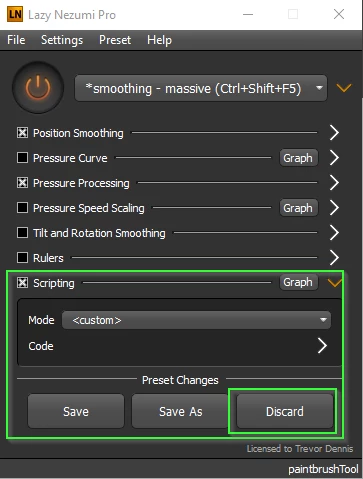
Incidentally, and as far as I know, Lazy Nezumi does not have a preference reset function. But when you enter any of the various areas, a Preset Changes > Discard or Save option appears. Hitting Discard takes you right back to the default. Saving a new preset can be very useful as the range of settings can be large, and some of the sliders can go from barely making a difference, to a Spinal Tap 11, with barely a nudge.
 AdChoices