January 9, 2026
Answered

Photoshop preview with pink tint

  • January 9, 2026
  • 2 replies
  • 218 views

I’m recently experiencing a strange issue with Photoshop.


All images appear to have a pink/magenta tint only in Photoshop’s preview. I know it’s not a monitor issue, because when I open the same image simultaneously in Illustrator and Photoshop, the colors look correct in Illustrator but pink-tinted in Photoshop (see attached screenshot).

Both files use the same color mode and color profile.

Saving the image in Photoshop and then opening it with Windows Photos shows the correct colors.


I’ve tried searching for information about this problem but haven’t found a solution yet.


Has anyone experienced something similar or knows how to fix it?

Correct answer Ged_Traynor

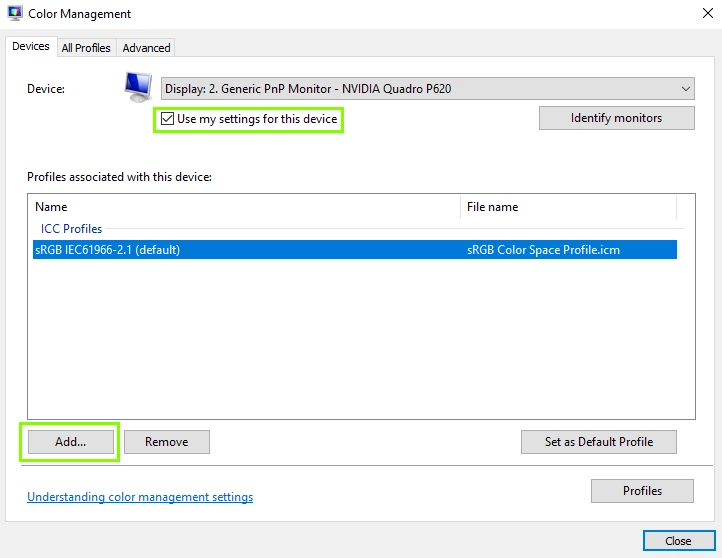
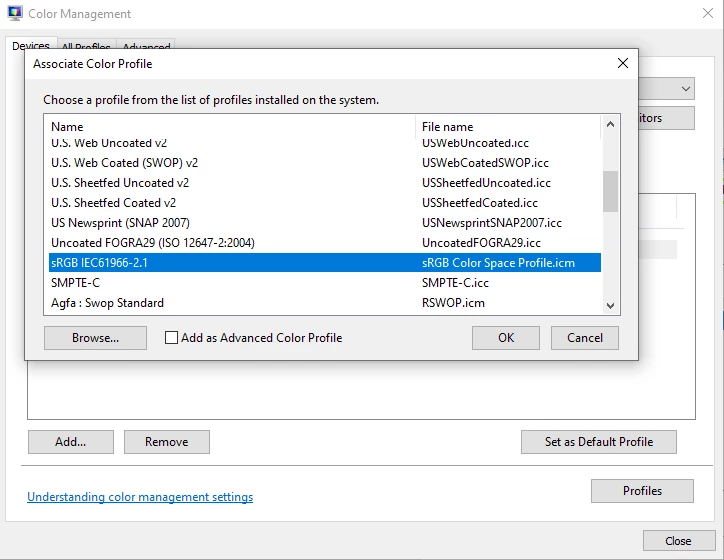
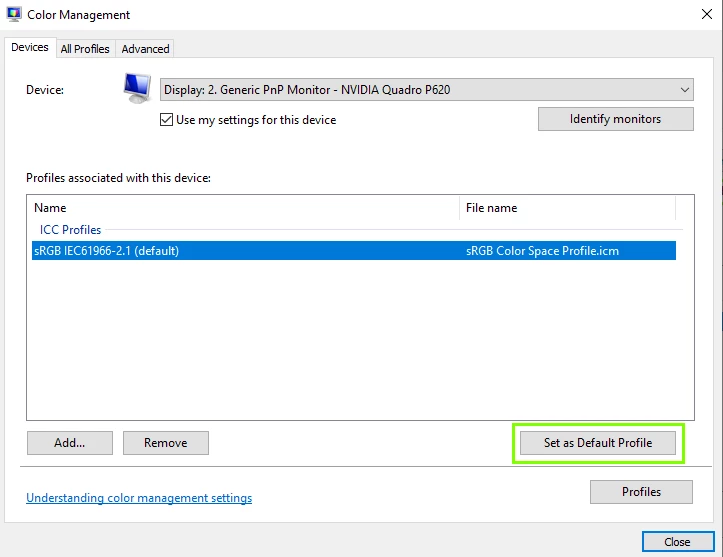
@perfect_inventor1975 can you check Windows colour management to see what profile is set there, if it's set to something other than sRGB change it to sRGB with the following steps, close Photoshop

image1.png

image2.png

2024-06-27 13_39_49-Window.png

2 replies

NB, colourmanagement
Community Expert
Community Expert
January 9, 2026

@perfect_inventor1975 I think @Ged_Traynor is right to suggest setting the display profile temporarily to sRGB because faulty display (monitor) profiles can affect different applications in different ways.

An issue often shows up in Photoshop, where other apps seem OK.

If setting to sRGB as @Ged_Traynor described means both Illustrator and PS have the same appearance, then that’s part one of the diagnosis done.

Now the cure, you need an accurate display profile because no display is accurately characterised by sRGB.

Best way to achieve this is using a screen calibration sensor and related software. e.g. Calibrite Display pro.


I hope this helps

neil barstow colourmanagement - adobe forum volunteer,

colourmanagement consultant & co-author of 'getting colour right'

See my free articles on colourmanagement online

Help others by clicking "Correct Answer" if the question is answered.

Found the answer elsewhere? Share it here. "Upvote" is for useful posts


January 9, 2026

Thank you so much for your reply.

I'll keep in mind what you said and calibrate my monitor as soon as I have the chance.


Have a nice day!

NB, colourmanagement
Community Expert
Community Expert
January 9, 2026

@perfect_inventor1975 that’s great, thanks from me and @Ged_Traynor I'm sure, who gave the thorough explanation. Its helpful to others when it works out, please mark the answer that helped as "correct" so it's an easy find for those having trouble 


I hope this helps

neil barstow colourmanagement - adobe forum volunteer,

colourmanagement consultant & co-author of 'getting colour right'

See my free articles on colourmanagement online

Help others by clicking "Correct Answer" if the question is answered.

Found the answer elsewhere? Share it here. "Upvote" is for useful posts 

Ged_Traynor
Community Expert
Ged_TraynorCommunity ExpertCorrect answer
Community Expert
January 9, 2026

@perfect_inventor1975 can you check Windows colour management to see what profile is set there, if it's set to something other than sRGB change it to sRGB with the following steps, close Photoshop

image1.png

image2.png

2024-06-27 13_39_49-Window.png

January 9, 2026

Yes!!!! That fixed the issue. Thank you so much!!!