

Most Funnest
Participating Frequently
April 23, 2023
Answered

Photoshop - Rotate View Tool - Rotates but moves the image from my work area

  • April 23, 2023
  • 5 replies
  • 2175 views

Hello,

I'm on an M1 Mac Mini running the most recent Photoshop. When I use the Rotate View Tool, instead of rotating the canvas and staying centered, my entire image moves out from under where I was working. Difficult to describe. My workflow is I Zoom into an area where I'm coloring, Hand Tool to center where I would like to render and then I normally use the Rotate View Tool to get a good angle to paint. The first two steps work fine but when I go to rotate it's like the compass or center point for the rotate is not the center of the area I'm working on. Is there a way to alter the postition that The Rotate View Tool uses to rotate from?

Thanks in advance,

Jeromy
This topic has been closed for replies.
Correct answer Jeff Arola

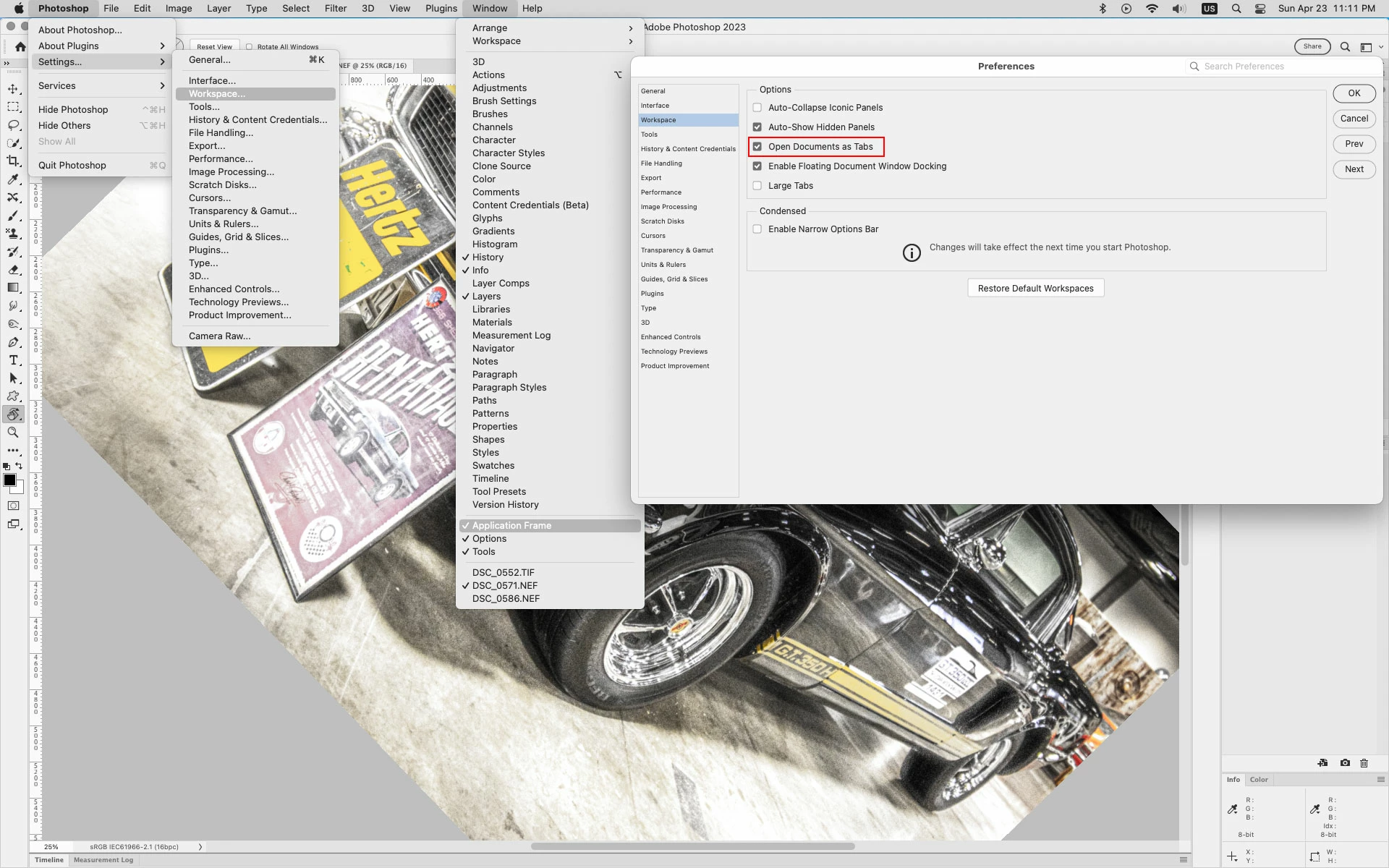
If you go to Photoshop>Settings (Preferences)>Workspace, check Open Documents as Tabs then go to Window and verify Application Frame is checked, and restart photoshop does that make any difference?


5 replies

Jeff Arola
Community Expert
Community Expert
April 24, 2023

If you want to use Floating Document Windows, go to Photoshop>Settings (Preferences)>Tools and check Overscroll

Tommy Tejeda
Participant
June 5, 2024

Thanks for your help first and foremost.
I want to use a floating window. I don't like the Layers, brushes, etc sticking right next to the image I'm working with. I like that separated. So "Application Frame'" in Windows takes care of the Rotate View Tool moving elsewhere after I rotate. 
But, If I check Overscroll (which I also hate) the image wonders infinitely. I don't like that.
In Photoshop 2018 none of this would happen.
Is there a way to make the Rotate View Tool "stay" where I'm working , especially in the area you zoomed in, AND with a floating window without the "Overcroll"?

Jeff Arola
Community Expert
Jeff ArolaCommunity ExpertCorrect answer
Community Expert
April 24, 2023

If you go to Photoshop>Settings (Preferences)>Workspace, check Open Documents as Tabs then go to Window and verify Application Frame is checked, and restart photoshop does that make any difference?


Most Funnest
Participating Frequently
April 24, 2023

This worked. Thank you so much.

Jeromy


Most Funnest
Participating Frequently
April 24, 2023

Here's a video of the strange reorienting of the page when using the Rotate View tool.

https://youtu.be/QAY52cnnH-o


Jeff Arola
Community Expert
Community Expert
April 23, 2023

Are you using Floating Document Windows?

Most Funnest
Participating Frequently
April 24, 2023

I was, but I just tried turning that off, quiting PS, reopening and the same thing occured.

Thank you Jeff.

Here's what it looks like.

https://youtu.be/QAY52cnnH-o