
Photoshop script - iterating through all layers and groups to export tagged layers in javascript
Hi there,
I'm having a hard time figuring out how to iterate through all layers/layer groups, getting alerts to give layer names, checking if layer.name.contains my tag, and more...
My goal is to export "Save for Web" JPEGs by finding layers marked with a tag.
The tag would be inside the layer name (example "[e]" ), though it could be something else.
The images can be nested within many folders, and I need the reference of certain folders to hide them.
The layer structure is usually layerGroup2> ..... > layerGroup7> layerGroup14> [e] image, image2, etc..
I'm thinking the process would be:
- iterate through all files and folders
- check if name contains tag
- if true, show layer, change export name+path, export, hide layer
- do this untill all images of layerGroup is exported, then hide layerGroup
My script runs right through to the alert "Export Complete". Even though my psd has many layers and layer groups with "[e]" tagged in their name. I'm not sure what I did wrong.
Here's my test psd layer setup:
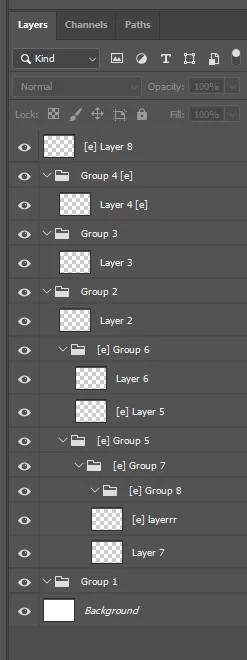
Note: I come from C# background, this is my first javascript/ps script attempt.
Also I cut off the export function since its very long.
//====== Heres my code: ===================
#target photoshop
app.bringToFront();
// Summary: Exports tagged layers as JPEGs.
//======= Ref Var =============
var doc = app.activeDocument;
var layerName = ""; //container to pass final layer name
var exportPath = ""; //container to pass final export Path
var exportName = ""; //container to pass final export Name
//====== Var Options ==============
var tag = "[e]"; // layers tag, helps determin which layers to edit
var themeName = "newTHEME"; // name to be change at export
var exportPathLocation = "~/Desktop/"; //default export location
//====== Export Name + Path ===========
// *Note* Ideally names wouldn't be in order and are given based on which parented layer groups its in.
var exportNames = // array of names in order to be used when exporting
[
"unique-THEME-export-name-HEX-paper-size",
"etc...",
"etc..."
];
// *Note* Ideally this script would create the folders at the desktop.
var exportPaths // array of export paths in order to be used when exporting
[
"\\Folder1\\Folder2\\Folder2_1",
"etc...",
"etc..."
];
// ==================== Main Script ====================
ExportAll(); // start script
function ExportAll() // the main body of the script
{
//1) iterate through all layer groups
for (var groupI = doc.layerSets.length - 1; groupI < 0; groupI--) // *Note* This setup assumes all layers will be in layer groups, I'd prefer it didnt.
{
alert('layerSets' + layerSets[i].name); //debug doesnt show name
if(layerSets[i].name.contains(tag)) //check if layer group has tag
{
Show(layerSets[i].name); //show layer group if so
//2) iterate through all layers within groups
for (var layerI = doc.artLayers.length - 1; layerI < 0; layerI--)
{
if(artLayers[i].name.contains(tag)) //check if layer group has tag
{
alert('artLayers' + artLayers[i].name); //debug doesnt show name
//3) show selected layer
Show(artLayers[i].name); //show layer
//4) update the export name and path
exportName = exportNames[groupI]; //export name changes based on layer group
exportName.replace("HEX", "HEX" + [layerI + 1]); // HEX# changes based on layer iteration #
exportName.replace("THEME", themeName); // rename the export Theme name
exportPath = exportPathLocation + exportPaths[groupI]; //destination folder + sub folder paths
//5) export
Export(exportPath, exportName);
alert('exported:' + exportName + "\n to: " + exportPath); //debug
//6) hide selected layer, increment untill all layers are exported then go to the next layer group
Hide(artLayers[i].name); //hide layer
}
}
Hide(layerSets[i].name); //hide layer group
}
}
//7) Completed Message
alert('Export Complete');
}
// ==================== Commands ====================
// *Note* These commands were taken from the ScriptListenerJs.
function Hide(layerName)
{
var idHd = charIDToTypeID( "Hd " );
var desc183 = new ActionDescriptor();
var idnull = charIDToTypeID( "null" );
var list34 = new ActionList();
var ref19 = new ActionReference();
var idLyr = charIDToTypeID( "Lyr " );
ref19.putName( idLyr, layerName ); //layer name
list34.putReference( ref19 );
desc183.putList( idnull, list34 );
executeAction( idHd, desc183, DialogModes.NO );
}
function Show(layerName)
{
var idShw = charIDToTypeID( "Shw " );
var desc184 = new ActionDescriptor();
var idnull = charIDToTypeID( "null" );
var list35 = new ActionList();
var ref20 = new ActionReference();
var idLyr = charIDToTypeID( "Lyr " );
ref20.putName( idLyr, layerName ); // layer name
list35.putReference( ref20 );
desc184.putList( idnull, list35 );
executeAction( idShw, desc184, DialogModes.NO );
}
function Export(exportPath, exportName)
{
//----------------------------------------
//*Note* This first part showed before the export command so I included it.
var idinvokeCommand = stringIDToTypeID( "invokeCommand" );
var desc185 = new ActionDescriptor();
var idcommandID = stringIDToTypeID( "commandID" );
desc185.putInteger( idcommandID, 1695 );
var idkcanDispatchWhileModal = stringIDToTypeID( "kcanDispatchWhileModal" );
desc185.putBoolean( idkcanDispatchWhileModal, true );
executeAction( idinvokeCommand, desc185, DialogModes.NO );
// ---------------------------------------
var idExpr = charIDToTypeID( "Expr" );
var desc186 = new ActionDescriptor();
var idUsng = charIDToTypeID( "Usng" );
var desc187 = new ActionDescriptor();
var idOp = charIDToTypeID( "Op " );
var idSWOp = charIDToTypeID( "SWOp" );
var idOpSa = charIDToTypeID( "OpSa" );
desc187.putEnumerated( idOp, idSWOp, idOpSa );
var idDIDr = charIDToTypeID( "DIDr" );
desc187.putBoolean( idDIDr, true );
var idIn = charIDToTypeID( "In " );
desc187.putPath( idIn, new File( exportPathFolder + exportPath ) ); //export path
var idovFN = charIDToTypeID( "ovFN" );
desc187.putString( idovFN, exportName ); //export name
//lots more export settings etc...
}
I've been trying at this for a few days now, any help is very much appreciated!
 AdChoices