simfreak
Known Participant
December 27, 2024
Answered

Photoshop Shop Actions with Channel Masks No Long Record

  • December 27, 2024
  • 5 replies
  • 433 views

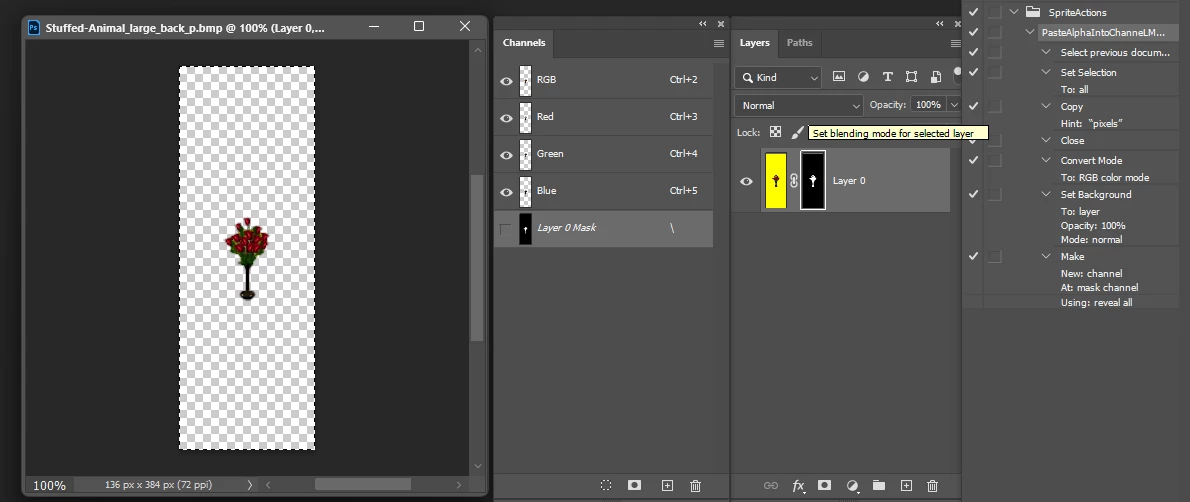
I have many recorded actions that paste an alpha channel from one image into a new quickmask of another bitmap to create a transparent image.  I have used this method for over 20 years wtih photoshop and now it will no longer record pasting into a mask on the newly created mask layer, but instead it pastes into a new layer which is useless to me.  
This feature for me is a must have and the fact that it no longer works the way it has for at least 24 years is really disappointing.  I'm going to assume this function was accidentally broken, so I need to know how to roll it back to whatever version it did work in.  Currently I am using the Photoshop Beta.  It does not work in 2024 either.
 

Correct answer Bojan Živković11378569

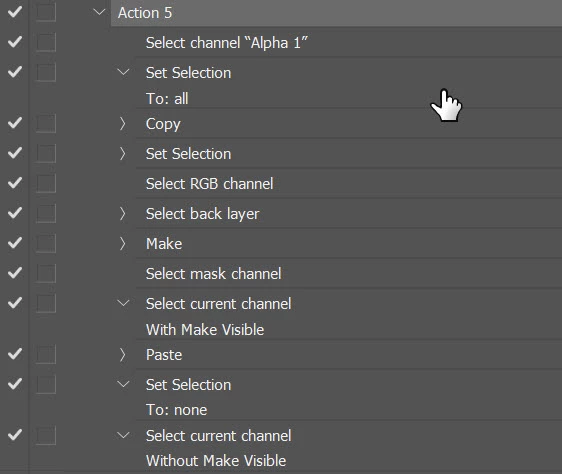
I managed to paste onto the mask using an action. It’s likely just a workaround. Here’s my take: after creating or selecting the layer mask, simply Alt + click on the mask, then paste and deselect. After that, Alt + click again to return to normal view. Please try it and let me know how it works on your end. I worked with a single document when recording actions, which should not change the outcome.

5 replies

Stephen Marsh
Community Expert
Community Expert
December 28, 2024

@simfreak 


If the post from @Bojan Živković11378569 is a correct answer, then please mark it as so.


If this still requires exploration, then please list step by step and or preferably provide a link to a layered sample image and saved .atn file for testing.

simfreak
simfreakAuthor
Known Participant
December 27, 2024

Worked like a charm.  Thank you so much.  

simfreak
simfreakAuthor
Known Participant
December 27, 2024

Thank you. I will give this a try.

simfreak
simfreakAuthor
Known Participant
December 27, 2024

Oh the image is the desired result, not what actually occurs.

Bojan Živković11378569
Community Expert
Community Expert
December 27, 2024

I managed to paste onto the mask using an action. It’s likely just a workaround. Here’s my take: after creating or selecting the layer mask, simply Alt + click on the mask, then paste and deselect. After that, Alt + click again to return to normal view. Please try it and let me know how it works on your end. I worked with a single document when recording actions, which should not change the outcome.