
annaxday
Participant
April 12, 2020
Question

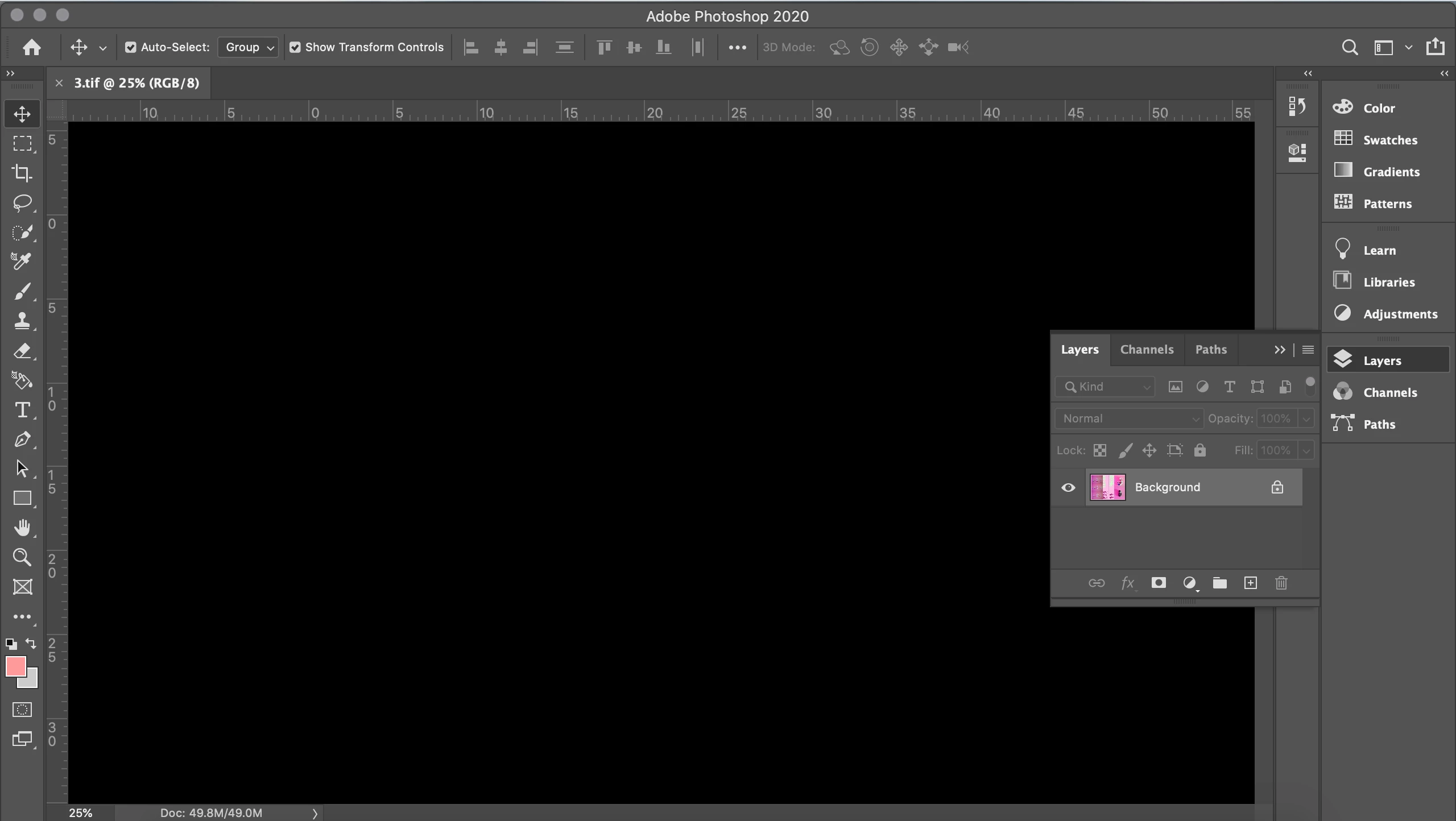
Photoshop showing a blank workspace

  • April 12, 2020
  • 3 replies
  • 2147 views

Hi all,


So, I've just updated Photoshop but for some reason, when I open an image or try and create a new image, the workspace is completely blank! However, the image shows in the layer thumbnail as you can see in the image below. 


I'm bit of a photoshop novice so if anyone knows how I can solve this issue I would be extremely grateful. 


Thanks!

Anna 
 

This topic has been closed for replies.

3 replies

gener7
Community Expert
Community Expert
April 12, 2020

One other idea in addition to what has been mentioned: Checkmark Legacy Compositing:

c.pfaffenbichler
Community Expert
Community Expert
April 12, 2020

Does turning off »Use Graphics Processor« in the Performance Preferences (Photoshop > Preferences > Performance > Graphic Processor Settings) and restarting Photoshop have any bearing on the issue? 

Bojan Živković11378569
Community Expert
Community Expert
April 12, 2020