


Zdeto
Known Participant
November 7, 2025
Question

Photoshop simple Save changes my file format to JPG

  • November 7, 2025
  • 1 reply
  • 46 views

Hi there!


Up until recently I was able to load a PNG file into Photoshop, made a few changes (remove something, resize, etc) and if I was having layers I would flatten the file first, then using Ctrl-S I could save the file in the same file format (PNG) with the same name, overwriting the initial file.

It was fine!

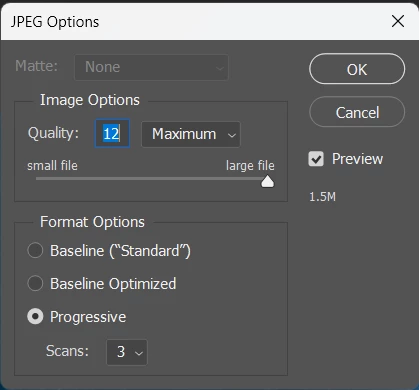
Now, everytime I do the same, trying to save (Ctrl-S) a file, it shows me the JPEG Options window. But I DON'T want to save it as jpg, I want the same loaded (PNG) file format.

This is delaying my workflow a lot, by forcing me to use "Save as" and some more clicks.

Is it a bug? Is is a "new" feature? If so, I don't want it 😛


1 reply

Community Manager
November 7, 2025

Hi @Zdeto, thanks for reaching out!
I tried reproducing this on my end but didn’t have any luck. Could you let us know which version of Photoshop you’re using? Also, if possible, please share a screenshot of the full Photoshop window (including the Layers panel) so we can take a closer look.
It’s possible the file you’re trying to save has something that isn’t compatible with the PNG format. If you’re working in CMYK color mode, try switching to RGB by going to Image > Mode > RGB Color and see if that helps.
Thanks, and let us know how it goes!
Alek

*(If you mention me with an @, like @Aleke, I’ll get a notification and can respond faster.)*