

Godzinski
Inspiring
October 31, 2025
Answered

Photoshop stops saving files at 99% since version 27.0.

  • October 31, 2025
  • 2 replies
  • 182 views

Photoshop stops saving files at 99% since version 27.0.
From time to time, when working on files, a problem occurs with saving

I don't save my files to the cloud, only to my hard drive – my files aren't synced with the cloud (In case anyone asks).

The error first appeared in BETA version 27.0, but now, after the latest update I made two days ago, it's also appearing in Photoshop 27.0.
Correct answer Godzinski

SOLVED
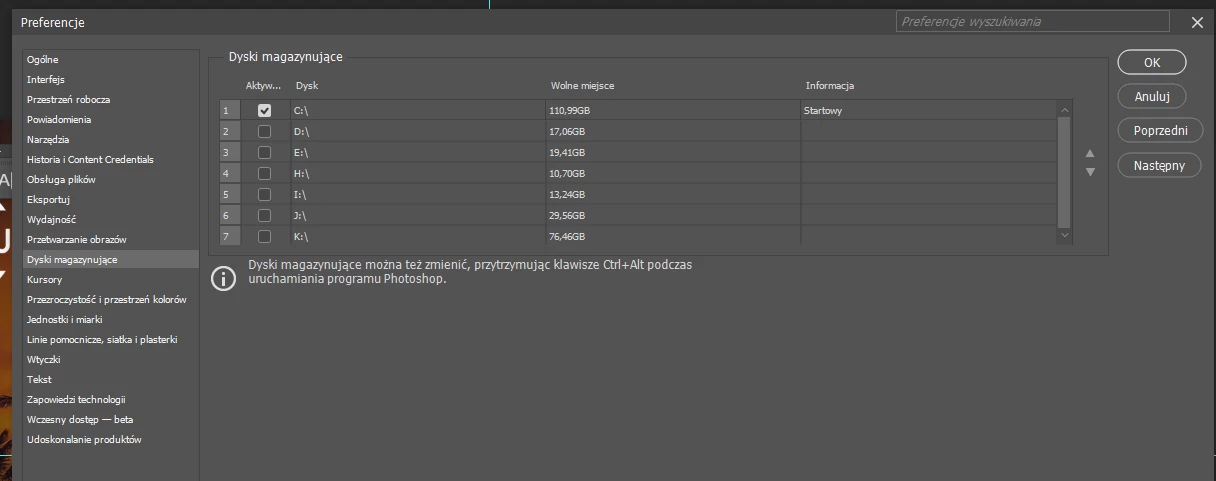
I moved the storage disk by holding ctrl+alt to D:/ / and the files started to be saved, even the previously damaged ones which always caused freezing at 99% / I restarted the program and moved it to C:/ / again and the problem is now gone

2 replies

Godzinski
GodzinskiAuthorCorrect answer
Inspiring
October 31, 2025

SOLVED
I moved the storage disk by holding ctrl+alt to D:/ / and the files started to be saved, even the previously damaged ones which always caused freezing at 99% / I restarted the program and moved it to C:/ / again and the problem is now gone

Sameer K
Community Manager
Community Manager
October 31, 2025

Hey, @Godzinski. Welcome to the Photoshop Community. I'll need more information to help you figure this out. Please share the system information from Photoshop Help > System info > Copy and paste into a text document > Upload and attach here. 


Where do you keep the original files, internal or external drive? Does this happen when you work with a specific set of files?

As a basic step, try this:

1 - Go to C Drive > Program Files > Adobe > Photoshop 2026 > Photoshop.exe > Right-click > Run as Administrator


2 - Change the destination of the source files to the internal drive, and if you're trying to save to a folder/location on an external drive, change that to the internal drive into a folder that isn't syncing to any cloud backup service. 

Working through a network, or an external drive, is unpredictable & is not recommended. Head here to learn more: https://adobe.ly/3A2G2zK 


Let me know how it goes. Thanks!
Sameer K
(Type '@' and type my name to mention me when you reply)

Godzinski
GodzinskiAuthor
Inspiring
October 31, 2025

1. I have a file on my hard drive that has a recurring problem (whenever I try to modify it in any way and save it, it freezes at 99%). There are only four layers in this file, and even if I move one, saving doesn't work (save as a copy works).

2. For example, completely new PSD documents save completely to 100%, but...

Today I was creating a new PSD document (Work Hour) and it froze at 99% when I finally tried to save it.