Participant
Jan 30, 2013 1:51 PM UTC
Answered

Photoshop text: Weird spacing between characters - How to fix?

Hi,

I bought Design & Web premium (NL), and I have a question about the spacing between characters in Photoshop, does someone now how to fix it? To show it's not a font-problem i used Verdana, Arial and now Tahoma, all with the same problems........I checked, all the text spacing is 0.

Can someone help me with this?

Thanks in advance!

By the way: sorry for my bad English..... : )
This topic is closed to new replies. Start a new post to keep the conversation going.
Lynx_PaulCorrect answer
Participant
Jan 30, 2013 2:17 PM UTC

Hi,

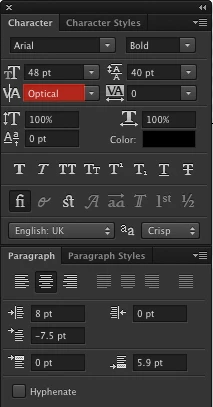
Try changing kerning from Metric to Optical.


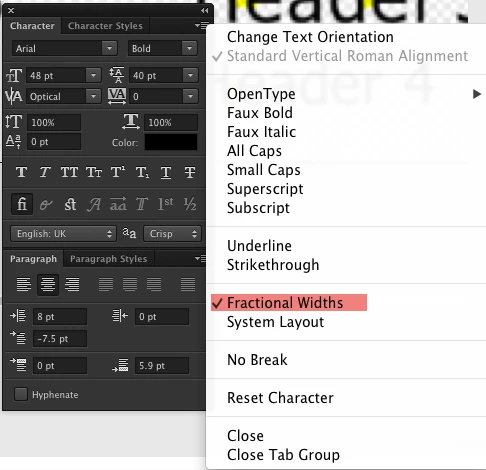
Another option is to switch off Fractional Widths.

Can you make the PSD available for download?

Hope this helps :-)

6 replies

Participant
Feb 19, 2021 9:43 PM UTC

Assign this option in paragraph menu. It worked for me.

Translate
Noel Carboni
Legend
Jan 30, 2013 2:21 PM UTC

It could be helpful to describe exactly how you created the text you're showing here.  Is it upscaled from a smart object? 

I ask because it's also fuzzier than it ought to be, implying it's been rasterized at some point.

Edit:  Never mind, I see I'm too slow.

-Noel

Translate
Lynx_PaulCorrect answer
Participant
Jan 30, 2013 2:17 PM UTC

Hi,

Try changing kerning from Metric to Optical.


Another option is to switch off Fractional Widths.

Can you make the PSD available for download?

Hope this helps :-)

Translate
Participant
Jan 30, 2013 2:20 PM UTC

Thanks, that did the trick!

Translate