
photoshop Thumbnail catalog erro
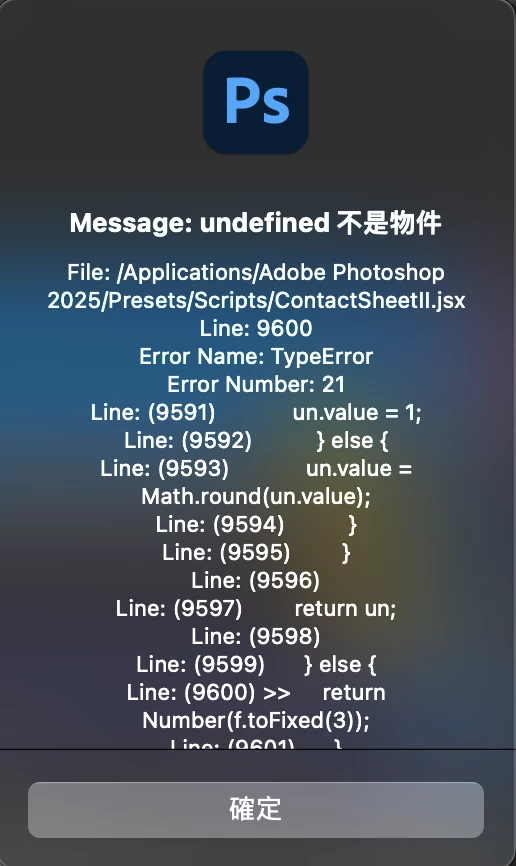
I use the thumbnail directory function of PS
he cannot use
And a long error code pops up
The same goes for common sense after uninstalling
The error code is as follows
File: /Applications/Adobe Photoshop 2025/Presets/Scripts/ContactSheetII.jsx
Line: 9600
Error Name: TypeError
Error Number: 21
Line: (9591) un.value = 1;
Line: (9592) } else {
Line: (9593) un.value = Math.round(un.value);
Line: (9594) }
Line: (9595) }
Line: (9596)
Line: (9597) return un;
Line: (9598)
Line: (9599) } else {
Line: (9600) >> return Number(f.toFixed(3));
Line: (9601) }
Line: (9602) };
Line: (9603)
Line: (9604) //
Line: (9605) // Function: updateUnitWidget
Line: (9606) // Description: Set the value of a numeric UI field
Line: (9607) // Input: obj - UI widget
Line: (9608) // type - UnitValue type
Line: (9609) // base - the resolution base (opt)
Line: (9610) // Return: number or UnitValue
[ContactSheetII.jsx]
main()
_main()
execCSII_UI([Object:[object Object]])
exceptionMessage([Error:\u985E\u578B\u932F\u8AA4: undefined \u4E0D\u662F\u7269\u4EF6])
Does anyone know how to answer it?


 AdChoices