


Photoshop Using 75GB RAM – Is This Normal?
Hey Adobe Team,
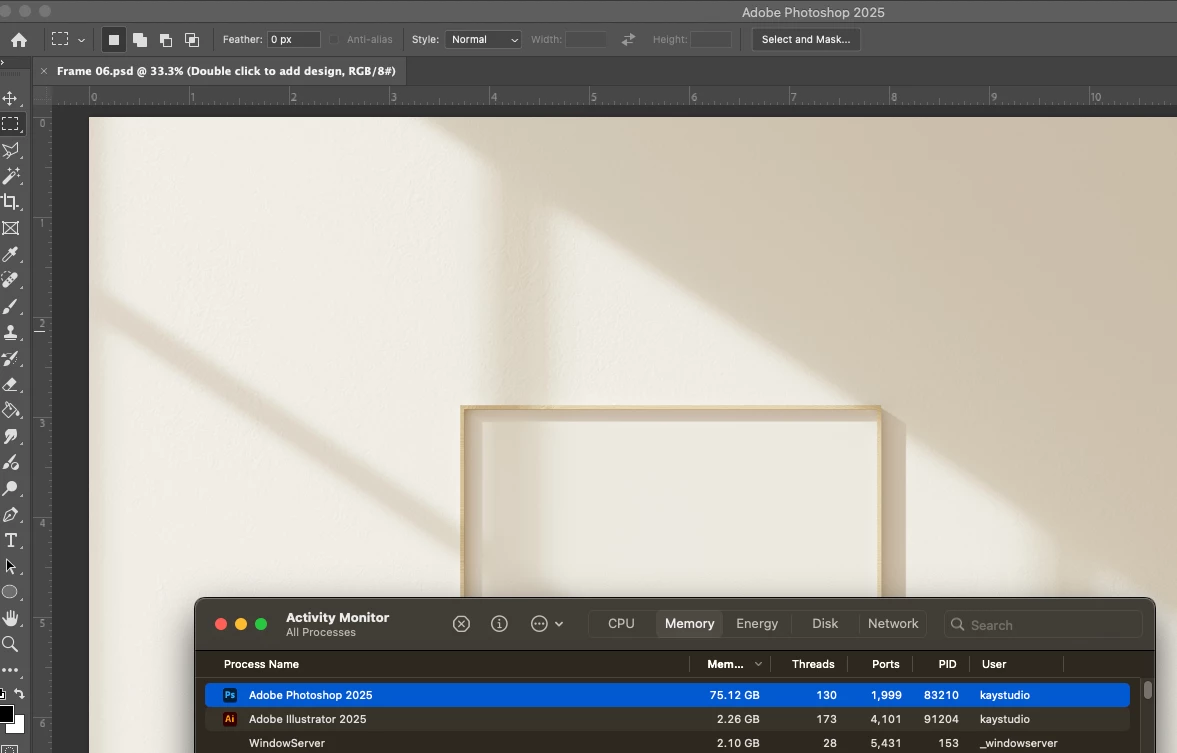
I’ve noticed that Photoshop is consuming an excessive 75.2GB of memory while working on just a few artworks. Given my system’s specs, I wouldn’t expect such extreme usage, and I’d like to understand what’s causing this.
System Specs:
MacBook Pro M4 Max (64GB RAM, 2TB SSD)
macOS Sequoia
Photoshop 26.3
Memory Usage Setting: 43,020MB
Observed Issues:
Opening a few high-resolution files quickly pushes RAM usage beyond 75GB.
Scratch disks get used heavily despite ample available space.
Performance slows down significantly, and Photoshop occasionally crashes.
Troubleshooting Steps Taken:
- Adjusted memory allocation in settings
- Cleared caches & temp files
- Modified scratch disk priorities
- Enabled/disabling GPU acceleration
- Reinstalled Photoshop
- Checked for background processes
Looking for Answers:
Is this a known issue, or is there a fix/workaround? I’d appreciate any insights on optimizing Photoshop’s memory usage because this is seriously affecting my workflow. Thanks in advance for any guidance!
 AdChoices