
Inspiring
October 17, 2024
Answered

Photoshop v25 OCIO is this correct behaviour ?

  • October 17, 2024
  • 2 replies
  • 1198 views

Hi all

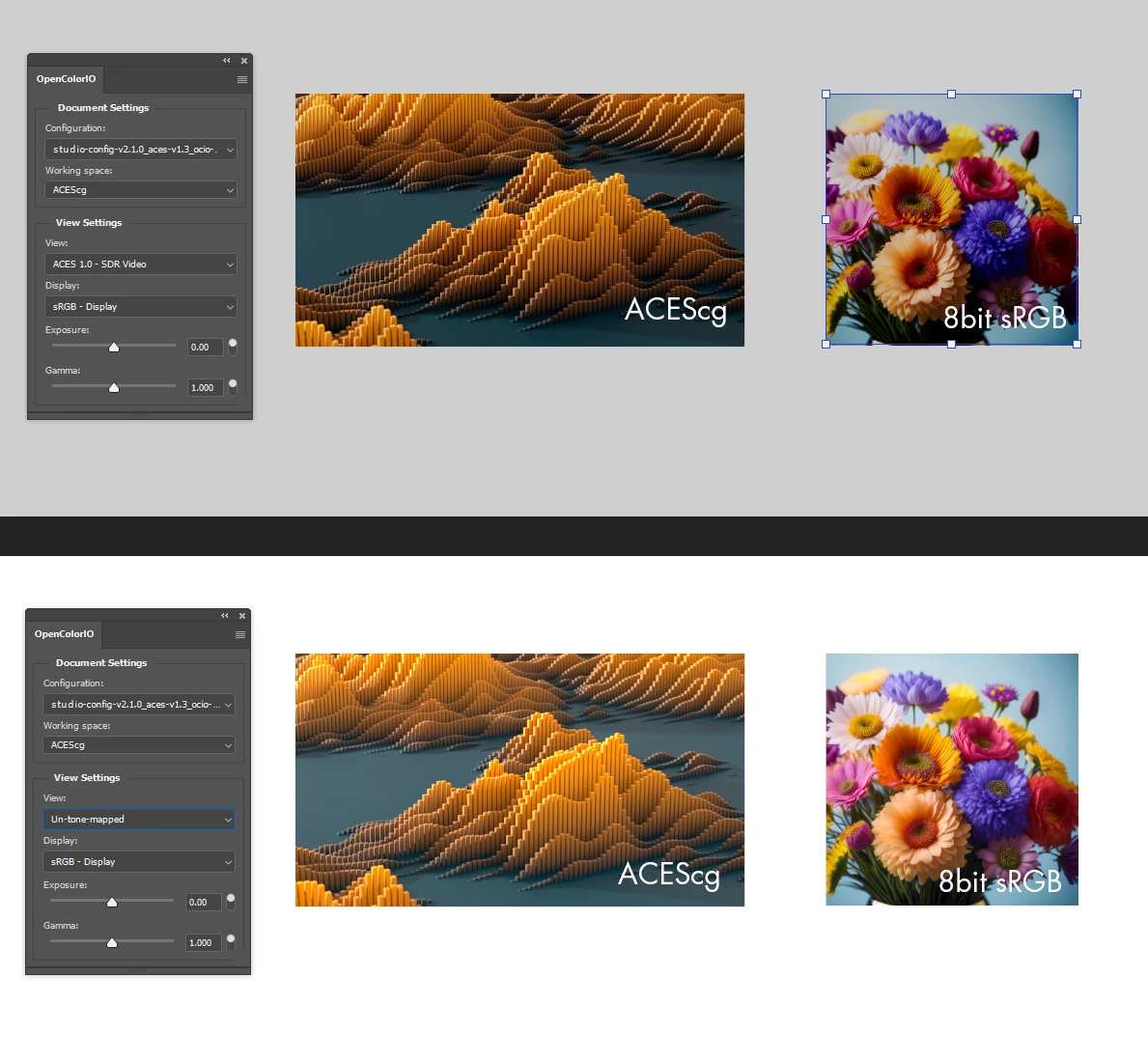
very pleased to see the new OCIO features built into the latest Photoshop release. I use OCIO in my 3d app working and rendering to ACEScg output. Pulling in the .exr file shows perfect colour matching looks all correct. However I have the following issue which I'm not sure why is happening if I add an sRGB image Layer to the same project...


If the document working space is set to ACEScg the .exr render looks correct with the Properties Panel  view set to  Aces 1.0 SDR, however the 8bit sRGB file is getting tonemapped. If I set the View to un-tonemapped the 8Bit file looks correct but the .exr is incorrect. So far this makes sense to me. I tried adding an OpenColor IO Adjustment Layer to compensate, looking for an ODT to correct out the tonemapping but couldn't find anything there to compensate. I've only got a need to know knowledge on ACES so maybe I'm missing some key knowledge here, so any help would be much appreciated. Would be very useful to have this working as I can comp in some sRGB content post render etc if required


Correct answer simo.b

Solved, but I thought I'd leave this here in case anyone needs a solution ...

Requires 2 OpenColorIO Adjustment Layers:

1st Layer set to:

  • OpenColor Display Transform
  • View: Un-tone-mapped
  • Display : sRGB/your display

2nd set to:

  • View: Aces1.0 - SDR Video
  • Display: sRGB/your display
  • Invert checked to reverse transformation


2 replies

Adobe Employee
January 14, 2025

Hi @simo.b, this is a general ACES concept, and not specific to Photoshop's implementation, and the fact you're not seeing 1:1 on the sRGB is technically correct. If you do some googling, you might find other discussions on this, but when using the ACES tone mapping, there's no way to correctly simultaneously get a 1:1 match of both scene referred data (your ACES renders) and display referred inputs (sRGB imagery). The way you can think about it is, if you filmed a scene in raw linear light, and part of that scene included an sRGB display, the tone mapper will be applied to the reproduction of that sRGB data, just like when you use a display-reffered image as input to the ACES pipeline. The issue with using the inverse display transform is that it assumes the image was originally encoded with the ACES sRGB tone mapper, and if not, then the working space scene-referred data will be completely inaccurate, and may or may not work as expected. Hope this makes sense and helps a little bit!

simo.bAuthorCorrect answer
Inspiring
October 17, 2024

Solved, but I thought I'd leave this here in case anyone needs a solution ...

Requires 2 OpenColorIO Adjustment Layers:

1st Layer set to:

  • OpenColor Display Transform
  • View: Un-tone-mapped
  • Display : sRGB/your display

2nd set to:

  • View: Aces1.0 - SDR Video
  • Display: sRGB/your display
  • Invert checked to reverse transformation


simo.bAuthor
Inspiring
October 17, 2024

* document working space is ACEScg with View set to Aces 1.0 SDR