


Inspiring
July 2, 2026
Answered

Photoshop v27.8.0 no longer displays thumbnails, only a generic icon

  • July 2, 2026
  • 5 replies
  • 51 views

When working with images (png., jpg., tiff etc) I no longer see thumbnails of the images in the directory I am working in. If I open the image and do some work on it and then do a Save as, move to the directory I want to save in I still do not see any thumbnails of the images in the directory, only generic icons. I have not changed any settings in Photoshop so don’t know what has happened.
    Correct answer AxelMatt

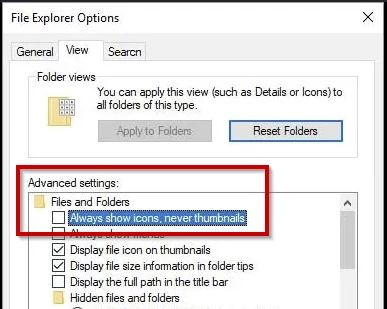
    @sjhoyes I can’t reproduce this. Check the appropriate setting in the File Explorer.

    1. Press Windows Key + E to open the file Explorer.
    2. Click the three dots in the top toolbar.
    3. Select Options to open the Folder Options window.
    4. Click the View tab at the top .
    5. Find and uncheck the box that says Always show icons, never thumbnails.
    6. Click Apply and then OK.


    5 replies

    sjhoyesAuthor
    Inspiring
    July 3, 2026

    It was the View setting (Always show icons, never thumbnails) in Windows Explorer. This surprised me because I haven’t used Windows Explorer in years and have not changed any setting in there. The problem only appeared Wednesday and only in Photoshop. All other programs displayed thumbnails correctly.

    Thanks very much for the help.

    AxelMattCommunity ExpertCorrect answer
    Community Expert
    July 3, 2026

    @sjhoyes I can’t reproduce this. Check the appropriate setting in the File Explorer.

    1. Press Windows Key + E to open the file Explorer.
    2. Click the three dots in the top toolbar.
    3. Select Options to open the Folder Options window.
    4. Click the View tab at the top .
    5. Find and uncheck the box that says Always show icons, never thumbnails.
    6. Click Apply and then OK.


    My System: Intel i7-8700K - 64GB RAM - NVidia Geforce RTX 3060 - Windows 11 Pro 25H2 -- LR-Classic 15 - Photoshop 27 - Nik Collection 9 - PureRAW 6 - Topaz Photo AI
    Jeff Arola
    Community Expert
    Community Expert
    July 3, 2026

    What about in Windows File Explorer itself without Photoshop, can you see the thumbnails instead of icons?


    What about images that are on the local C drive or the drive you have Windows 11 and Photoshop itself installed on?

    Rob_Cullen
    Community Expert
    Community Expert
    July 3, 2026

    If it is only PSDs that do not show-

    Google AI Answer-  “Windows File Explorer does not natively support thumbnail previews for Photoshop (PSD) files. To view them, you must configure your folder settings and install a free third-party shell extension (like SageThumbs or PSD Codec) to act as an image translator for Windows.”

    It also helps viewing any files in File Explorer to turn on [Show File extensions].

    I also cannot see PSD files in File Explorer-


    Regards. My System: Windows-11, Lightroom-Classic 15.4.1, Photoshop 27.8, ACR 18.4, Lightroom 9.4, Lr-iOS 10.4.0, Bridge 16.0.3 .
    Jeff Arola
    Community Expert
    Community Expert
    July 2, 2026

    What operating system do you have?


    Could you post a screenshot of what your seeing?

    sjhoyesAuthor
    Inspiring
    July 2, 2026

    I am using Windows 11 Pro v25H2 with all updates applied.

    When I look at these directories with Bridge thumbnails are shown