


Inspiring
June 17, 2026
質問

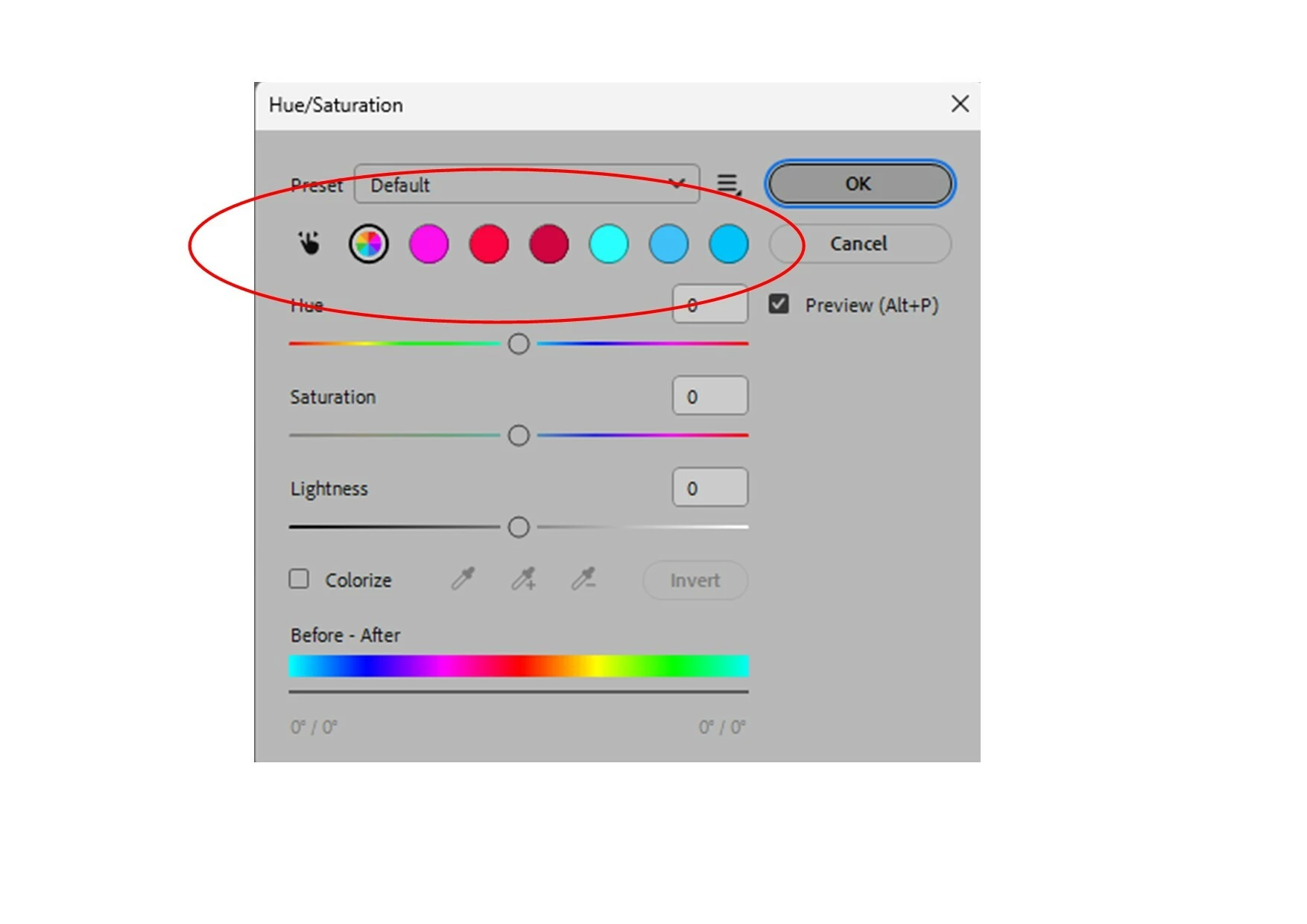
Photoshop v27.8 installed today on windows 11 PC. The remove tool now works very slowly and Hue/Saturation now disaplays incorcet colour some of which appear to be inactive.

  • June 17, 2026
  • 返信数 4.
  • 108 ビュー

v27.8 update installed today on Windows 11 PC. So far I have experience two issues:

  1. The remove tool now works very slowly. (As a separate issue I have been having problems with the remove tool for some time. The remove does not always work, leaving instead a blank area the exact shape of the area covered buy the tool and I get a pop up from AMD (graphic card) inviting me to report the problem. I have done so repeatedly but never get any sort of response from them. If I restart Photoshop or the PC the problem goes away for a short time but then reoccurs).
  2. Hue/ Saturation now displays incorrect colours some of which appear to be inoperative.
     

    返信数 4

    ikonmina作成者
    Inspiring
    June 19, 2026

    Thanks to all respndents. 

    I have tried disabling the graphics processor and purging the cache of PS and ACR without any change in baviour. I have never purged caches before and my IT skills arelimited so was not 100% sure how to do this. In PS I selected Edit / Purge….only video cache was active, ‘clipboard’, ‘historic’ and ‘All’ are greyed out, so I selected video.

    I then went into Bridge and selected Edit / Prefernces and un-slected use graphics processor. I have AMD set to automatically update to latest and this is confirmed by checking . 

    I am a regular user of PS for photography only and whilst working within what I know I can manage acceptably but my skills are very limited when I need to delve into what for me is ‘unknown territory’. Perhaps I shoulkd repeat that I am 81 years old and now find that I am tensing towards the limit of my IT abilities. I don’t for example know how to test with a different GPU driver version.

    Is there a way to uninstall the last PS update to see if this resolves the issue?

    faisu887
    Participant
    June 19, 2026

    It sounds like the v27.8 update may have introduced a compatibility issue with your AMD graphics driver. Since both the Remove Tool and Hue/Saturation are affected, try updating to the latest AMD driver or temporarily disabling Preferences > Performance > Use Graphics Processor to see if the problem disappears.

    Also try:

    Reset Photoshop preferences.
    Clear Camera Raw and Photoshop caches.
    Test with a different GPU driver version (some newer AMD drivers can cause issues).

    If disabling GPU acceleration fixes both problems, the issue is most likely related to the AMD driver rather than Photoshop itself.

    Community Expert
    June 19, 2026

    @ikonmina I’ve check this on my machine and can’t reproduce this, neither the slowness on the remove tool nor the Hue/Saturation issue.

    Which setting do you use for the Remove Tool, Cloud or local? See here:

    Improve Select Subject and Remove Background in Photoshop | Photoshop


    Try to reset the Photoshop preferences. somtetimes it may help.https://helpx.adobe.com/ie/photoshop/using/preferences.html#Manually

    Remember to back up your settings before doing the preference reset:  https://helpx.adobe.com/ie/photoshop/using/preset-migration.html


    My System: Intel i7-8700K - 64GB RAM - NVidia Geforce RTX 3060 - Windows 11 Pro 25H2 -- LR-Classic 15 - Photoshop 27 - Nik Collection 9 - PureRAW 6 - Topaz Photo AI
    Sameer K
    Community Manager
    Community Manager
    June 18, 2026

    Hey, @ikonmina. Welcome to the Photoshop Community. I'll help you figure this out. 

    I've tried to recreate this, but I couldn't recreate it exactly. Please share a video of the issue and the system info from Photoshop Help > System info > Copy and paste into a text document > Upload and attach here.


    Please test and confirm if Photoshop (Beta) has an issue. You can get Photoshop (Beta) from the Creative Cloud > Apps tab > Beta Apps section. 


    Thanks! 
    Sameer K

    (Type '@' and type my name to mention me when you reply)

    ikonmina作成者
    Inspiring
    June 18, 2026

    Hi @ Sameer K,

    Thanks for your reply. I’m afriad my computer skills have never been very well developed and now that I am 81 years old they are startingtoslip away. I will struggle to make a video of the issue...but quite simply when I open a file and then Hue / Saturation the normal range of colour no longer appear, instead thew colours as my oriiginal message, some of which don’t seem to work at all and others not with the colours expected. This is entirely new and immediatel following installation of the latest PS update.

    I attach the system info as requested. I have never delved into Betas and am wary of doing so now.

    My graphics card (is that the coreect terminplogy these days) is an AMD Radeon RX 6500XT


    For information my graphics card is