
rikkis39811563
Participant
March 25, 2020
Answered

Photoshop Won't Open: MSVCP140.DLL is not designed to run

  • March 25, 2020
  • 2 replies
  • 4521 views

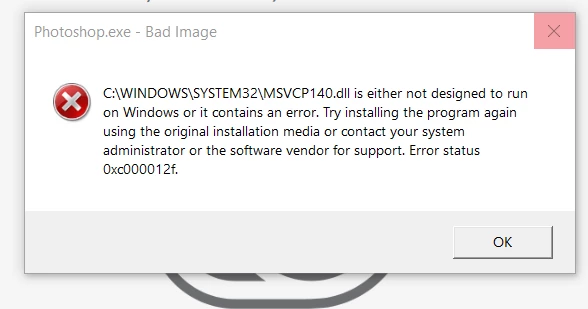
Through out the past I have been able to open photoshop. Last week was the last time I use Photoshop. When I tried using it today (3/25). My Adobe Photoshop won't open and would spam an error messge. Had to click cancel at least 8 - 14 times for that error message to go away. The only thing I can think of for my photoshop to mess up is my laptop updating, giving my Microsoft Egde logo a new look. It updated 2 days ago (3/22).

Please is there any way to get this fixed. Photoshop is my only job to get through this lockdown.
This topic has been closed for replies.
Correct answer Akash Sharma

Hi there,


Sorry that the missing .DLL file is not letting you use Photoshop. Would you mind checking out the troubleshooting steps mentioned in this article https://helpx.adobe.com/creative-cloud/kb/missing-msvcp110dll.html and let us know if that helps? 


Thanks, 

Akash

2 replies

Participant
January 30, 2021

Hi there, i have the same problems, but the troubleshooting steps Solution 1 and 2 didn't work..

Regards,

Martin

Akash Sharma
Legend
February 3, 2021

 Hi Martin,


Sorry that you're getting an error "MSVCP140.DLL is missing" while using Photoshop.


Which version of Photoshop are you using?


Would you mind checking the troubleshooting steps mentioned in this article https://answers.microsoft.com/en-us/windows/forum/windows_10-performance-winpc/msvcp140dll-is-missing-in-my-win-10/1c65d6b0-68b8-4b59-b720-3e6a33038389 and let us know if that helps?


Thanks,

Akash

Participant
February 8, 2021

Hi Akash,


I am having the same issues as Martin and those steps did not reasolve the issue for me. I am using Photoshop 2021, all up to date, according to my computer. The article was not helpful, I don't think I am computer-savvy enough to apply their treatement of the problem with C++ to this Photoshop issue.


Pamela

Akash Sharma
Akash SharmaCorrect answer
Legend
March 26, 2020

Hi there,


Sorry that the missing .DLL file is not letting you use Photoshop. Would you mind checking out the troubleshooting steps mentioned in this article https://helpx.adobe.com/creative-cloud/kb/missing-msvcp110dll.html and let us know if that helps? 


Thanks, 

Akash

rikkis39811563
Participant
March 26, 2020

Thank you! Turns out my photoshop wasn't up to date. Though I had it on auto update so I won't worry about keeping track of that, silly me.