



Photoshop won't start a transform with guides visible
As the title says: I tried to transform a layer to straighten an object, so I drew a few guides.
Then, when I hit Cmd+T, nothing happens. Edit > transform is grayed out as well.
When I hit Cmd+H to hide the guys, Transform works as expected. Once in 'Transform' (handles visible) I can hit Cmd+H again to see the guides and everything works as it should.
Edit: Hmm. Cmd+; to toggle visibility of the guides does NOT have the same effect. If I hit Cmd+H (to hide the guides), then Cmd+; to make them visible again, transform DOES work. If I then hit Cmd+H again, nothing seems to happen (the guides shoud toggle off again I'd say, but they don't), but again Transform won't start.
Edit2: Seems that the issue was that I also had an (empty) path in the Paths window that was highlighted, so apparently PS thought I was trying to transform that?
Unticking this solved it:
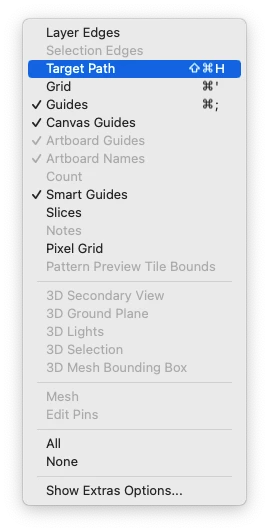
No idea if this is a new option?
Not a big issue, but annoying, and I don't understand what's happening.
OSX 12.6.8. PS CC 25.4.0

 AdChoices