Shastajak17
Participating Frequently
May 25, 2025 3:02 PM UTC
Answered

Photoshope 2025 Some Blending Modes Greyed out

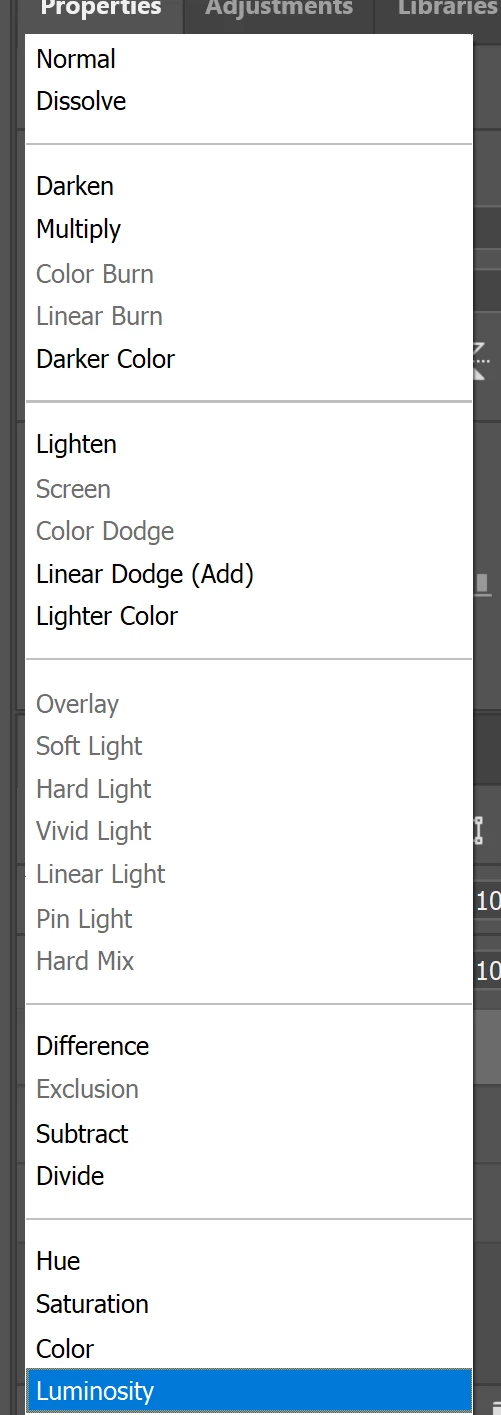
I have three layers and want to blend the top one using Overlay, but it's greyed out along with others.  I use this all the time what has happened? See screen print below:
 

D Fosse
D FosseCorrect answer
Community Expert
May 25, 2025 3:28 PM UTC

What is the image mode / bit depth?

4 replies

D Fosse
Community Expert
D FosseCommunity ExpertCorrect answer
Community Expert
May 25, 2025 3:28 PM UTC

What is the image mode / bit depth?

Translate
Shastajak17
Participating Frequently
May 25, 2025 3:38 PM UTC

For some reason it had shot up to 32 bit! I usually use 8 or 16 bit.  I've changed it to 16 and that seems to have worked.  I don't understand why it should change.  I import photos from Lightroom, so maybe that's changed.


Thank you for your guidance!

Translate
Shastajak17
Participating Frequently
May 25, 2025 3:40 PM UTC

It doesn't appear to be Lightroom!


Translate
Shastajak17
Participating Frequently
May 25, 2025 3:27 PM UTC

Some filters are also greyed out!


Translate