
JohnDG Photography
Known Participant
Nov 10, 2026 2:37 PM UTC
Answered

Phtoshop 28.0 Wrong colour selection in Hue/Saturation when using Preset "Default"

Photoshop 28.0.0 20261027.r.20 395c45 x64 (final, Release)
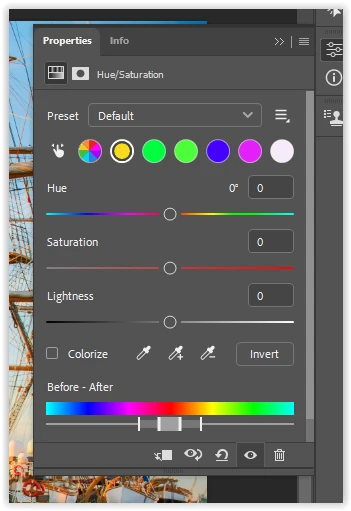
When using Hue/Saturation and using preset “Default” the colours displayed are wrong.
The first colour after the multi colour wheel used to be red. It displays as yellow, but the slider still indicates red. Using that slider, the red colour is influenced.
Next is the green, but it is actually the yellow slider,  etc …
When using the preset “prominent colors” the colour sliders are correct.  But not when you toggle back to “default”.

Included is a screenshot when selecting the Yellow dot, but the slider display red (this should be the first colour, not yellow)


    Eugene TysonCorrect answer
    Community Expert
    Nov 12, 2026 4:05 AM UTC

    This looks like a regression in Photoshop 28.0 rather than a preferences issue.

    The same problem was reported during the Photoshop Beta releases, where the Hue/Saturation colour buttons were incorrectly mapped to the colour ranges.

    Adobe previously acknowledged an issue with the new interface and suggested disabling it as a workaround.

    You could try going to Edit > Preferences > Interface, unchecking Enable Modern User Interface, and restarting Photoshop.

    This should restore the older Hue/Saturation interface. It would be interesting to know whether that resolves the issue in version 28.0.

    12 replies

    Inspiring
    Nov 20, 2026 5:25 PM UTC

    Same thing is happening with the Selective Color adjustment layer. 


    Translate
    Participating Frequently
    Nov 12, 2026 11:18 AM UTC

    Looks like a bug in the new Photoshop interface. As a workaround, go to Edit > Preferences > Technology Previews, uncheck "Enable Modern User Interface", and restart Photoshop. This should bring back the old Hue/Saturation interface, where the colour selections display correctly. Hopefully Adobe fixes this in a future update so there's no need to keep using the old interface.

    Translate
    Eugene TysonCommunity ExpertCorrect answer
    Community Expert
    Nov 12, 2026 4:05 AM UTC

    This looks like a regression in Photoshop 28.0 rather than a preferences issue.

    The same problem was reported during the Photoshop Beta releases, where the Hue/Saturation colour buttons were incorrectly mapped to the colour ranges.

    Adobe previously acknowledged an issue with the new interface and suggested disabling it as a workaround.

    You could try going to Edit > Preferences > Interface, unchecking Enable Modern User Interface, and restarting Photoshop.

    This should restore the older Hue/Saturation interface. It would be interesting to know whether that resolves the issue in version 28.0.

    Translate
    JohnDG Photography
    Known Participant
    Nov 12, 2026 6:01 AM UTC

    In the “old” interface it is correct.  Red is the first and has the red slider.

    Translate
    Participant
    Nov 12, 2026 1:34 AM UTC

    I’m having the same issue after the 28 update.  An adobe support person reset all my preferences among other things and could not solve it 

    Translate
    davescm
    Community Expert
    Community Expert
    Nov 10, 2026 2:48 PM UTC

    I have seen that in a previous version but I don’t see it in v28.0 (although I have done a complete preference reset since updating for another issue which may have impacted it)

    Dave

    Translate
    JohnDG Photography
    Known Participant
    Nov 10, 2026 3:09 PM UTC

    I saw it in pre-releases before and reported it.
    Today I upgraded my 27 version to 28 and  … it's now in the released version.
    And it's only with "default” preset.

    Translate