Participant
September 16, 2025
Answered

Pinsel für Hautfalten in gezeichneten Portraits erstellen - mit Schattierungen

  • September 16, 2025
  • 1 reply
  • 62 views

Pinsel für Hautfalten in gezeichneten Portraits erstellen - mit Schattierungen

Die gez. Linie sollte gleichzeitig eine dunklere und hellere Schattierung zeichnen, damit man im gez.

Portrait Hautfalten zeichnen kann. Also gleichzeitig eine dunklere und hellere Schattierung. Die auch

dunkler wird, bei stärkerem Aufdruck.


Wer weiss Rat?

Correct answer Trevor.Dennis

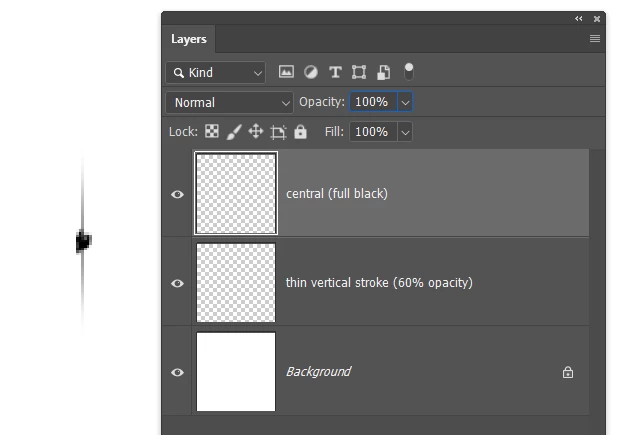
I have run into this problem before.  If you use an outer area that is blurred and lower opacity, it still paints fully black because each stamp of the brush overlaps.  So you need to make the shading part very thin like below, and experiment with spacing.  You also need to set angle jitter to Direction, which leads to another problem, that being spokes in the outer shading on tight curves.

Even with spacing set to 1% the spoke effect is still evident.


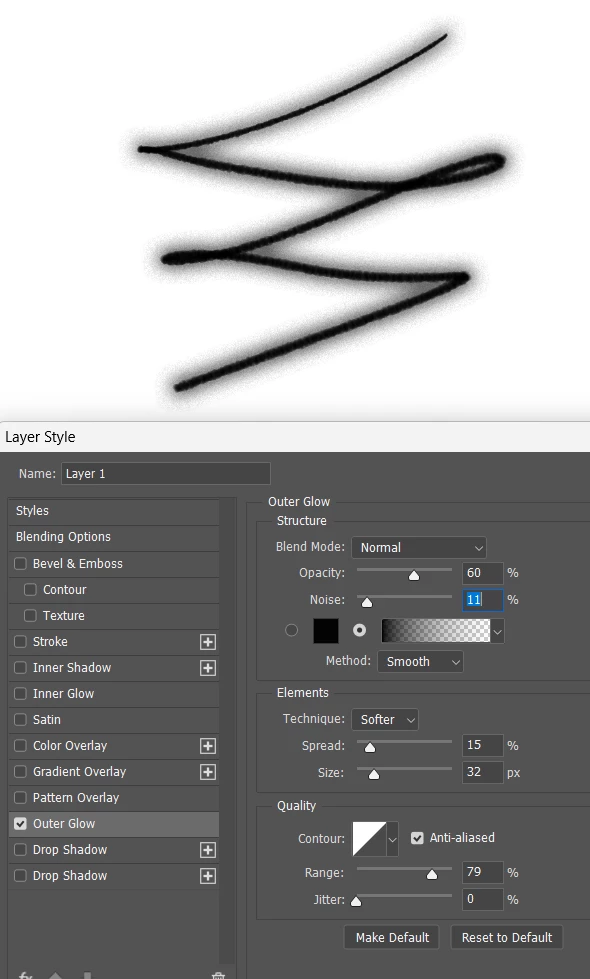
So maybe better to use layer styles


If you want to devote more time to it, take a look at Dual Brushes.  A lot of Kyle Webster's presets work that way, so find something close and reverse engineer it.


1 reply

Trevor.Dennis
Community Expert
Trevor.DennisCommunity ExpertCorrect answer
Community Expert
September 16, 2025

I have run into this problem before.  If you use an outer area that is blurred and lower opacity, it still paints fully black because each stamp of the brush overlaps.  So you need to make the shading part very thin like below, and experiment with spacing.  You also need to set angle jitter to Direction, which leads to another problem, that being spokes in the outer shading on tight curves.

Even with spacing set to 1% the spoke effect is still evident.


So maybe better to use layer styles


If you want to devote more time to it, take a look at Dual Brushes.  A lot of Kyle Webster's presets work that way, so find something close and reverse engineer it.