
Participant
November 16, 2023
Question

placeEvent can not set image to layer correctly
  • November 16, 2023
  • 3 replies
  • 192 views

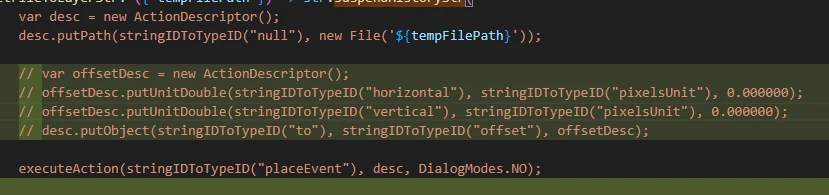
I try to use "placeEvent" to set image to layer, but new layer lost some pixel(not offset problem)
and I also try to paste image to layer directly, it can work correctly,  then I just need to set the right offset to make two layers matching.
although "placeEvent" can make a right size layers(512 * 512), but it looks like the pixels are overall shifted by 1px in a certain direction.
I saw an article saying this problem: Solved: place a pictures and the left=0,top=0 - Adobe Community - 10410203
I try it but I can not get the correct layer, it seems that I meet other problem
so I also try open new document and duplicate, it works properly


This topic is closed to new replies. Start a new post to keep the conversation going.

3 replies

Participant
November 17, 2023

with my allday testing, I found that the problem is caused by photoshop's current screen position like this

I execute the script then it will have 1px offset comparing with the origin image, so I think that it is a bug of photoshop?

Participant
November 17, 2023


we can see that the ear obviously move above, but there is no gap in the entire layer, the bottom pixels are filled:


Participant
November 16, 2023
open new document and duplicate: 
        var activeDoc = app.activeDocument
        var sourceDoc = app.open(new File('${tempFilePath}'))
        var duplicatedLayer = sourceDoc.layers[0].duplicate(activeDoc)
        sourceDoc.close(SaveOptions.DONOTSAVECHANGES)
but it will  flash even though I use app.activeDocument.
suspendHistory, so I dont want to resolve it by this way