


stude62
Participating Frequently
October 19, 2020
Answered

Plain square brushes

  • October 19, 2020
  • 2 replies
  • 16627 views

Where can I find plain square brushes?  I have been all over the brush tool settings - I can only find artistic brushes that have ragged edges. 
How have looked online where people say that Photoshop comes with them, but I don't have a selection that says square round brushes in the drop-down menu.  Round and artistic I have, but if there are square brushes, I am not seeing them. 
I am using a Windows10 machine, cc, build 21.2.4.  My skill level is advanced beginner, so if this sounds foolish, I apologize.

Any and all help is appreciated. 
Correct answer Jeff Arola

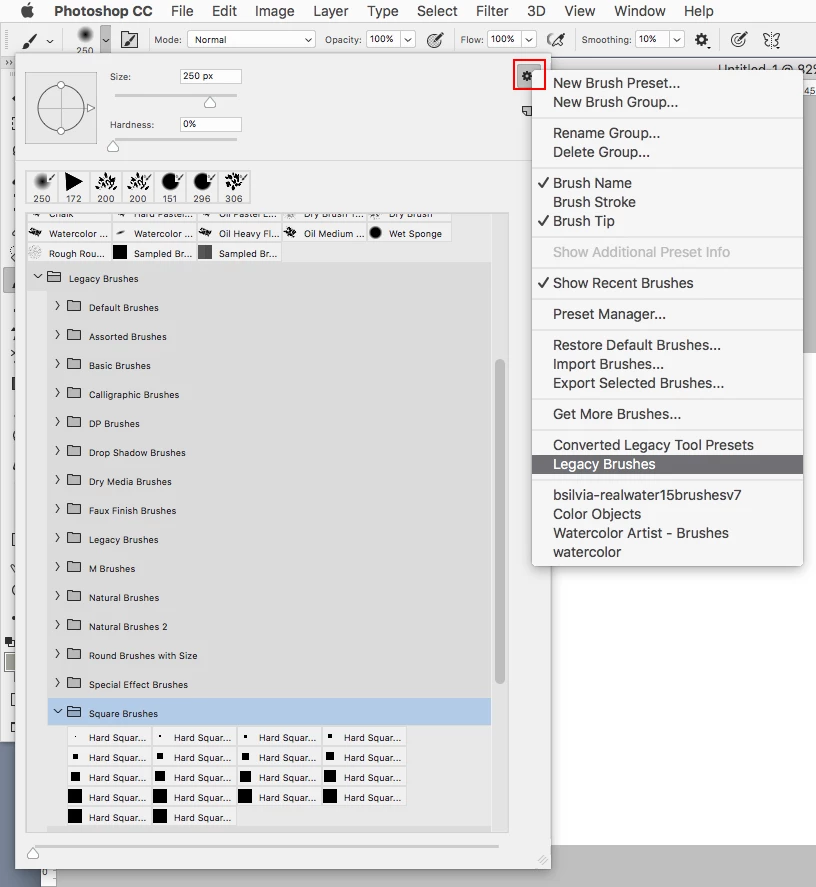
From the Brush picker flyout menu click Legacy Brushes and the Square Brushes set should be there.


2 replies

Jeff Arola
Community Expert
Jeff ArolaCommunity ExpertCorrect answer
Community Expert
October 19, 2020

From the Brush picker flyout menu click Legacy Brushes and the Square Brushes set should be there.


stude62
stude62Author
Participating Frequently
October 19, 2020

You are my new hero.   Seriously, I felt like such an idiot for not being able to find it.   THANKS!!

stude62
stude62Author
Participating Frequently
October 19, 2020

I need to clarify - I have round brishes, artistic, etc.  Its the square brushes only that I need to find.