

AllmondPrinting
Participating Frequently
November 24, 2025
Question

PLEASE, fix this massive memory leak in your software!
  • November 24, 2025
  • 5 replies
  • 707 views

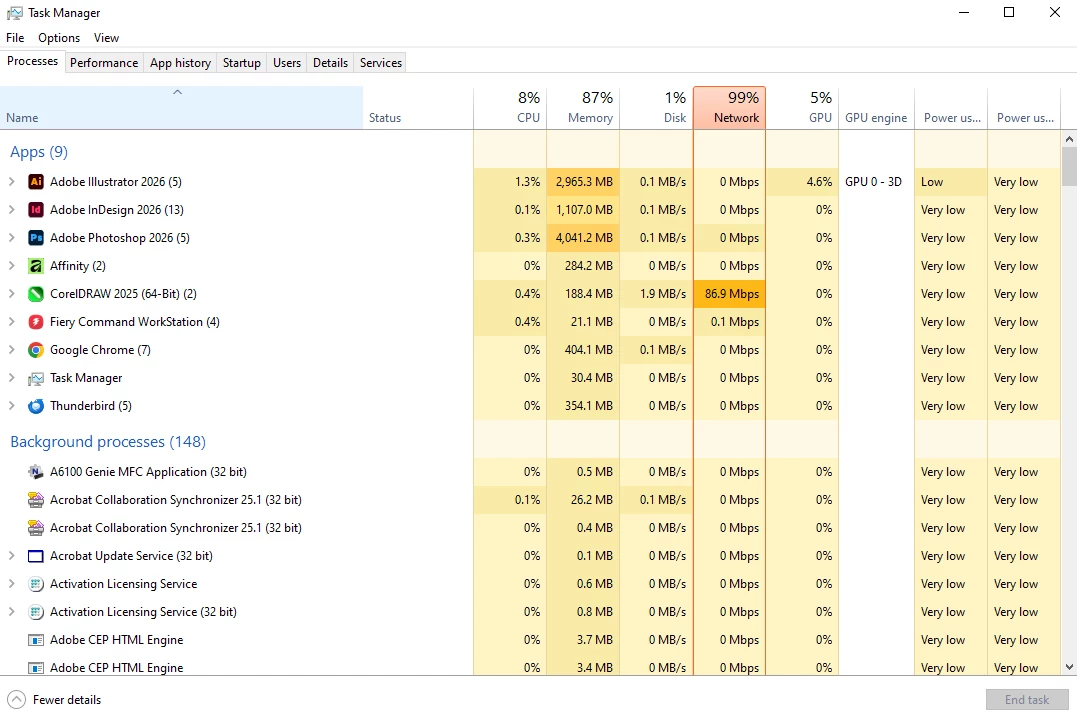
There are NO files open in ANY program on my computer, and Illustrator, InDesign, and Photoshop are hogging ALL of my RAM. Since the last update, my computer has been glitchy, so I had a little check this morning and see THIS. We pay entirely too much for this subscription to have it bring our computers to a halt this way. 

5 replies

Community Expert
December 2, 2025

@AllmondPrinting  I've checked on my side and I see that Photoshop consumes right after the start approx 5,5 GB of RAM.

There's no image open. This is a normal behavior as @D Fosse  wrote.

AxelMatt_0-1764668100125.png

I can't test it with InDesign and Illustration. I don't have installed it.


quote


There are NO files open in ANY program on my computer, and Illustrator, InDesign, and Photoshop are hogging ALL of my RAM. Since the last update, my computer has been glitchy, so I had a little check this morning and see THIS. ...


By @AllmondPrinting


What do you mean with "my computer has been glitchy"? Please describe a little bit more detailed.

How much RAM do you have installed on your computer? 

If your like to work with Photoshop, Indesign and Illustrator more or less on the same time, you need a powerful computer. In this case it's commend to have 32GB RAM.


You can also post your System info. This can be get for example from the Photoshop menu item Help > System Info. There's a copy button in the System Info dialog. Press this button and paste the info into your next forum post.


@Chloe_Parker0991  At the moment I don't see a memory leak that should be reported to Adobe.


My System: Intel i7-8700K - 64GB RAM - NVidia Geforce RTX 3060 - Windows 11 Pro 25H2 -- LR-Classic 15 - Photoshop 27 - Nik Collection 9 - PureRAW 6 - Topaz Photo AI
D Fosse
Community Expert
Community Expert
December 2, 2025

ChatGPT, no real new information.

@Chloe_Parker0991 

D Fosse
Community Expert
Community Expert
November 25, 2025

A couple of GB has always been normal for as long as I remember. I'm told it can be higher if you have a lot of brushes, patterns, gradients, presets etc.


I took a look in Task Manager here, and this is what I get with a cold start of Adobe applications:

D Fosse
Community Expert
Community Expert
November 26, 2025

Oh, forgot to say: If the computer is "glitching", whatever is meant by that, this is not the reason. There is nothing in those originally posted numbers that indicate any particular drain on the system.

AllmondPrinting
Participating Frequently
December 1, 2025

I'm sorry, but when Photoshop is using more than 4 GB of RAM with NOTHING open, something is seriously wrong!

AllmondPrinting
Participating Frequently
November 25, 2025

This was BEFORE any files were opened in the software. I got to work, started all the programs, played online for around 10 minutes and my computer started glitching (been doing it since the Adobe updates a week or two ago). Opened Task Manager and this is what I saw. No work had been done in any of the programs before this screenshot.

D Fosse
Community Expert
Community Expert
November 24, 2025

This looks perfectly normal, if you've had a few reasonably sized files open. This isn't a memory leak.


By design, Photoshop does not release memory when you close files. That memory is reused and recycled for the next files you open. This is what makes efficient batch processing possible. Requesting memory from the operating system for every file would be much slower.


The memory is released when you close Photoshop.


Raster image editing in general requires huge amounts of memory, much more than any RAM you may have installed. So Photoshop writes temporary working data to disk, aka the scratch disk. That's the heavy lifting. Physical memory only holds the most current data, limited to the amount you have set in Preferences. By default this is 70%.


Most of the memory/scratch disk goes into storing the history states. To reduce the I/O footprint, reduce history states.