
Please help! Tricky removal of background behind hair
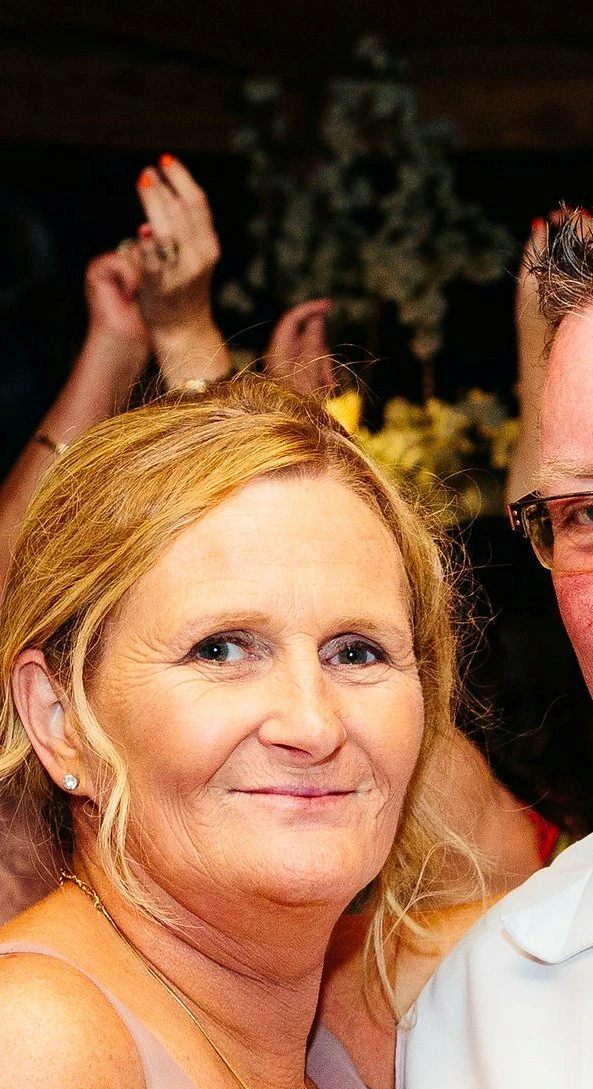
Please help a newbie out! I don't have a lot of experience with Photoshop and only have the CS2 version to work on. I'm trying to buy a friend a charm with an image of her and her recently deceased fiance engraved on to it. Luckily because of the engraving, the photo they're working from doesn't need to be absolutely perfect. Unluckily, I have no idea what I'm doing!
I used the extract tool and did ok around the top of her head but where her hair falls near to her shoulders, there is another person's body in the background which is almost the same colour as my friend's hair and this is where I'm having major issues.
Could someone please advise how to go about this. I'm on a bit of a time crunch as the gift is for her 50th birthday in a couple of weeks and need to get the photo to the jewellery designer. It's going to be a hard birthday for her because her fiance had big plans for it before he dropped dead without warning 4 months ago. You will see that her fiance is also in the photo but a photographer removed the background for that part of the photo as it was used on cards during his funeral so I can just put them together if I can get my friend's image right.
Please help. Thanks in advance.
 AdChoices