


Participant
December 2, 2015
Answered

Polygon and magnetic lasso tool missing???

  • December 2, 2015
  • 6 replies
  • 98156 views

OK, where did this go now? There has always been a popup under the lasso tool with both the polygon and the magnetic lasso. I use them both a lot. Are they gone, or am I just experiencing a glitch with this lovely $500 a year creative cloud?

Correct answer Chetna Srivastava

Hi BeaconPromo39250

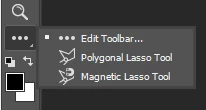
It seems that your toolbar has been edited.

Choose the Edit Toolbar > right click or command click > it should contain polygon lasso and magnetic lasso tool.

6 replies

rawfires
Inspiring
August 20, 2024

Tool Bar has been changed by Adobe. Also Adobe keeps changing the default tools in each workspace(based on this thread of solutions and problems). So if you want something, that adobe changed default toolset inside a workspace. Two solutions change workspace till you find the tool you want or right click the three dots on tool bar and then click and drag tools from back and forth to add or remove from toolbar. See screencaps below. 

gregdoh
Participant
May 15, 2022

I've been trying to find it for 15 minutes now with no luck. I have the regular lasso tool but following the answers here to find the magnetic isn't of any help. When I click on the lasso tooll on my other computer, it shows the other two lasso options, but this computer only has the regular lasso for some reason. 

mknobil
Participant
January 24, 2020

Also missing polygon lasso tool .. Resetting to "Essential" did not do it. I discovered the top right Search icon. Searched Polygon tool, and presto! It appeared in place .. This shouldn't happen with a fresh install of Photoshop.

mknobil
Participant
January 24, 2020

OOOPS! All the options for the tools that I used to access by clicking the little triangles in the lower right of each tool gliff, are now revealed with a three finger swipe over the tool .... (Mac - infrequent user .... :-// 


Participant
April 14, 2021

for anyone who ended up here from google over a year later, click and hold on the lasso icon to get the alternate modes. -_-

nickip18012677
Participant
August 1, 2018

'It seems that your toolbar has been edited'  So by a ghost?! - I certainly haven't touched it - I had the same problem - infact many of the tools had disappeared.  I was forced to go to CC as 5.5 didn't work with High Sierra.  I am paying a stupid amount for something that has more bugs in than is acceptable. 

Participant
December 15, 2016

Also, OP could be on a different workspace. Click the icon at the top right for workspace and choose "Essential." Now, try and right click on the lasso tool and see if it is there. It should be there by default now.

Participant
September 5, 2017

Found this answer the most helpful, thank you my friend.

Chetna SrivastavaCommunity ManagerCorrect answer
Community Manager
December 2, 2015

Hi BeaconPromo39250

It seems that your toolbar has been edited.

Choose the Edit Toolbar > right click or command click > it should contain polygon lasso and magnetic lasso tool.

Beacon-DJAuthor
Participant
December 2, 2015

Weird I haven't touched anything since opening it 1/2 hour ago.

Got it figured out now. Well at least this question and answer is out there now for searches, I couldn't find an answer

Thanks.

Community Manager
December 2, 2015

you're welcome.

Glad to help