
Possible solution for laggy / slow text tool and scaling on Photoshop CC 2020, 2021, 2022 and 2023
For context: I was having problems with every single version after Photoshop CC 2019 when using the text tool, specially when I was trying to scale text layers with the free transform tool. It was VERY slow and I couldn't work because of how laggy it was, so I was stuck with the 2019 version for years - which lead me to a a lot of trouble because my work colleagues were creating PSD files with the newer versions and I couldn't open them properly because of the lack of retroactive compatibility.
So, I tried a LOT of things: deactivating and reactivating using the graphic processor, the OpenCL, the native canvas and so on. Algo tried updating (and downgrading) graphic drivers, reseting and reinstalling Photoshop and even the Windows.
But, the solution was actually shockling simple and I felt very dumb when it worked. So, I wish you the best of luck if you are having the same problem and really hope this helps:
I simply went to the character window on the Photoshop interface and changed the "Smooth" - which came by default - to "Windows".
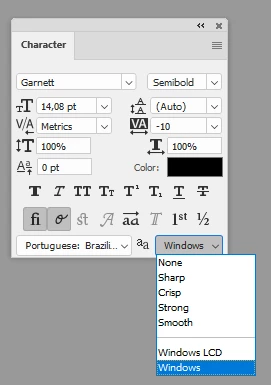
And... voilà. I'm no longer having this problem.
I'm stunned I could't found this suggetion anywhere before and I'm so relieved I intuitively tried this now, so I'm sharing it here.
Again, I really hope this helps someone else.
Btw, not a native english speaker here, so sorry for any mistake.


 AdChoices