
gillesenvrac
Participating Frequently
September 4, 2026
Answered

Pourquoi je reçois encore cette notification : Fin de la prise en charge des apps basées sur Intel alors que j'ai un Mac M4 ?
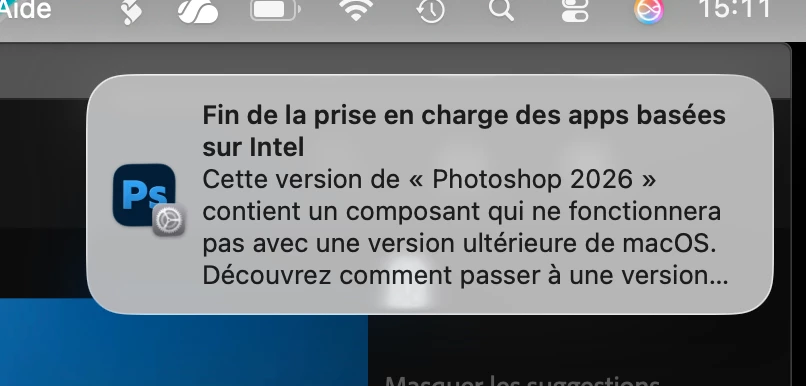
  • September 4, 2026
  • 2 replies
  • 30 views

Est-ce ma version de Mac OS (26.7) ou ma version de Photoshop (27.10.0) qui pose problème ? 

    Correct answer Anshul_Saini

    Hi ​@gillesenvrac,

    Thank you for reaching out. I understand the concern, seeing an "End of support for Intel-based apps" notification on a brand new M4 Mac is understandably confusing!

    Photoshop runs natively on Apple Silicon, including M4. I just wanted to let you know that your version of Photoshop is not the problem. What's happening is that this notification is coming from macOS itself (not from Adobe). Starting with macOS 26.4, Apple displays a system-level alert whenever an app or any of its components, such as a plug-in, extension, or add-on, uses Rosetta (Apple's Intel translation layer).
     

    The most likely cause is that you have one or more legacy plug-ins or extensions installed that still rely on Intel code. Even though Photoshop itself is fully native for Apple Silicon, an older plug-in running through Rosetta can trigger this macOS notification.
     

    Here's what you can do:

    • In Finder, locate the Photoshop application, press Command-I (Get Info), and look at the Kind field. It should say "Application (Universal)" or "Application (Apple silicon)." If "Open using Rosetta" is checked, uncheck it.

    • Review your installed plug-ins. Older plug-ins (especially CEP-based or non-UXP plug-ins) may require Rosetta. Check with each plug-in developer to see if an Apple Silicon-native or UXP version is available.


    If the notification persists even after confirming that Photoshop is not in Rosetta mode and you have no legacy plug-ins installed, please let us know; we can look into this further.
     

    Best regards,
    Anshul Saini

    2 replies

    gillesenvrac
    Participating Frequently
    September 4, 2026

    Thanks for your reply,

    I checked the “rosetta” stuff before, and it is still OK : it is unchecked.

    For the plugins, I checked the few places where it is supposed to be listed, and as you can see with the screen grabs, at one place, there is no plugin. and at the other place, there is two plugins : Camera Raw and something I didn’t know : Adobe Substance 3D Viewer (Beta) 

    This is the only plugin that I can think of… but I don’t see where I could unload it.

    Under the “plugin” subdirectory of Photoshop on my computer, there is no plugin, just an empty directory called Generator. 

    Thanks for your time,

    Gilles

    Anshul_Saini
    Community Manager
    Anshul_SainiCommunity ManagerCorrect answer
    Community Manager
    September 4, 2026

    Hi ​@gillesenvrac,

    Thank you for reaching out. I understand the concern, seeing an "End of support for Intel-based apps" notification on a brand new M4 Mac is understandably confusing!

    Photoshop runs natively on Apple Silicon, including M4. I just wanted to let you know that your version of Photoshop is not the problem. What's happening is that this notification is coming from macOS itself (not from Adobe). Starting with macOS 26.4, Apple displays a system-level alert whenever an app or any of its components, such as a plug-in, extension, or add-on, uses Rosetta (Apple's Intel translation layer).
     

    The most likely cause is that you have one or more legacy plug-ins or extensions installed that still rely on Intel code. Even though Photoshop itself is fully native for Apple Silicon, an older plug-in running through Rosetta can trigger this macOS notification.
     

    Here's what you can do:

    • In Finder, locate the Photoshop application, press Command-I (Get Info), and look at the Kind field. It should say "Application (Universal)" or "Application (Apple silicon)." If "Open using Rosetta" is checked, uncheck it.

    • Review your installed plug-ins. Older plug-ins (especially CEP-based or non-UXP plug-ins) may require Rosetta. Check with each plug-in developer to see if an Apple Silicon-native or UXP version is available.


    If the notification persists even after confirming that Photoshop is not in Rosetta mode and you have no legacy plug-ins installed, please let us know; we can look into this further.
     

    Best regards,
    Anshul Saini