Participant
May 30, 2025
Answered

Premade graphics

  • May 30, 2025
  • 3 replies
  • 342 views

In this book im  studying It says when I need a shape such as a symbol or object the placeI can turn to is the Shapes panel which contains a wide selection of Premade Graphics but nothing comes up in mines. What do i do on that. I need help please somebody

Correct answer Trevor.Dennis

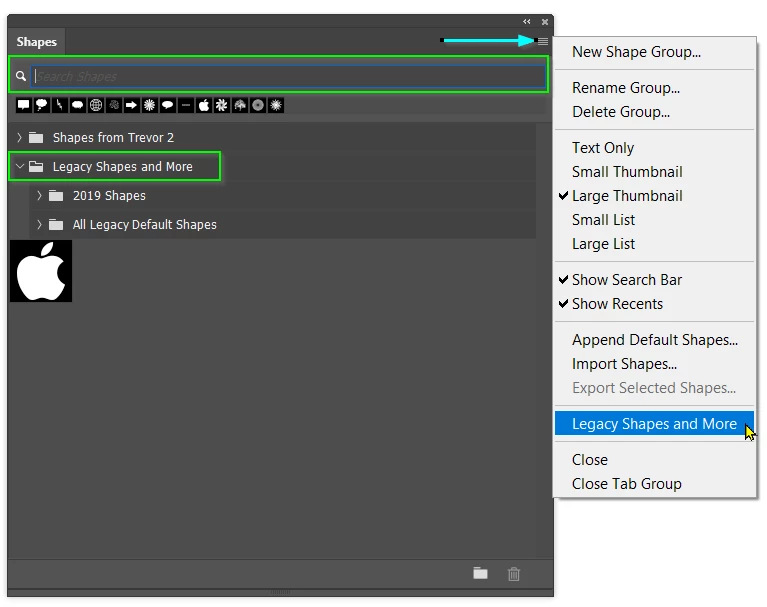
Your best friend with all Photoshop presets and assets is the search bar, because there can be hundreds to look through, and they will be in closed groups so you can browse them as easily as you might like to.  However, the search tool will only hunt through groups in its main window, and if my memory is correct, the bulk of the Shapes in Legacy Shapes and More is not loaded by default.  You have to load them via the pop-out menu (my cyan arrow top right corner).
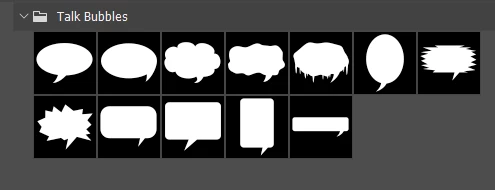
The search tool is totally literal and will use your exact spelling, so be aware of that, and try different search words.  i.e. the shapes below might be called Talk, or speach bubbles.  The search tool will look for groups as well as actual shapes, and if the shapes in a group you locate do not use the same word you found the group with, the group will be closed.  The secret then is to select that group, and remove the search word (it won't let you open the group while the search word is still present) .  You will 'hopefully' then be able to locate that group and twirl it open.
 

I like to drag the panel I am working with into the document window to give me lots of space.  What makes this convenient is a short Action that sets and resets my defualt Workspace which I trigger with F5 (function key). this lets me instantly tiddy up a messed up workspace with the press of a single key.


3 replies

Trevor.Dennis
Community Expert
Trevor.DennisCommunity ExpertCorrect answer
Community Expert
May 30, 2025

Your best friend with all Photoshop presets and assets is the search bar, because there can be hundreds to look through, and they will be in closed groups so you can browse them as easily as you might like to.  However, the search tool will only hunt through groups in its main window, and if my memory is correct, the bulk of the Shapes in Legacy Shapes and More is not loaded by default.  You have to load them via the pop-out menu (my cyan arrow top right corner).

The search tool is totally literal and will use your exact spelling, so be aware of that, and try different search words.  i.e. the shapes below might be called Talk, or speach bubbles.  The search tool will look for groups as well as actual shapes, and if the shapes in a group you locate do not use the same word you found the group with, the group will be closed.  The secret then is to select that group, and remove the search word (it won't let you open the group while the search word is still present) .  You will 'hopefully' then be able to locate that group and twirl it open.


I like to drag the panel I am working with into the document window to give me lots of space.  What makes this convenient is a short Action that sets and resets my defualt Workspace which I trigger with F5 (function key). this lets me instantly tiddy up a messed up workspace with the press of a single key.

Participant
June 28, 2025

Thank You helpful Learn Something 

Conrad_C
Community Expert
Community Expert
May 30, 2025

If you open the Window menu and choose Shapes, the Shapes panel opens.

Within the Shapes panel are grouped categories of shapes that you can look through.


pixxxelschubser
Community Expert
Community Expert
May 30, 2025

Which version of Photoshop are you using?
Does the screenshot help you a bit?
