
Swandive stream
Inspiring
June 30, 2023
Answered

Preserve aspect ratio by default is off (Photoshop Beta)

  • June 30, 2023
  • 1 reply
  • 1230 views

Previously aspect ratio lock was on by default but now it's not. Is there a way to switch it back on? Something in preferences?

This topic has been closed for replies.
Correct answer Swandive stream

Could you please post meaningful screenshots with the pertinent Panels (Toolbar, Layers, Options Bar, …) visible?

Did you try checking the button in the Options Bar? 


I figured it out. I turned on the 🔗
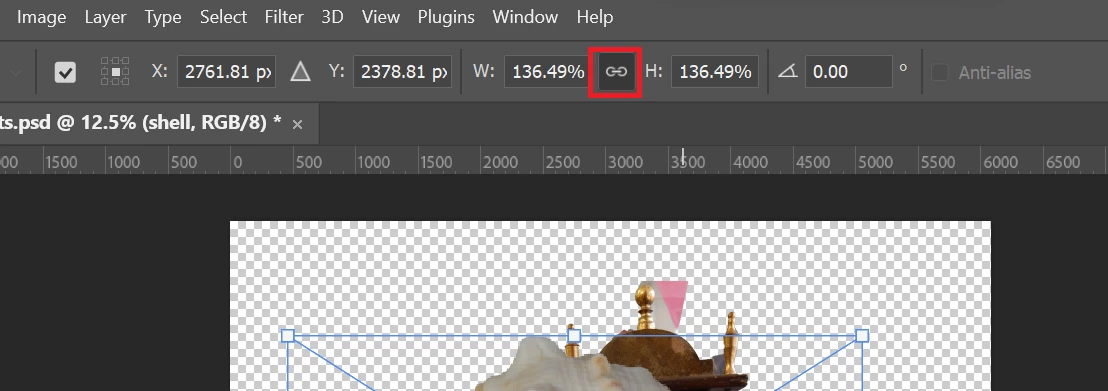
 

1 reply

c.pfaffenbichler
Community Expert
Community Expert
July 2, 2023

Please explain what you are talking about. 

Free Transform? 

The »Maintain aspect ratio«-setting for that should stick, so if you uncheck it it should be unchecked the next time and vice versa. 

Swandive stream
Inspiring
July 3, 2023

In the previous stable version of Photoshop (2023), when I used the transform handles to scale an image width, for example, height was also scaled to preserve aspect ratio. This saves having to hold Shift every time since it is automatic.


In PS 2023 Beta, the aspect ratio preservation has been turned off so I have to hold Shift or the image distorts when scaling.


I want to turn on the automatic presevation of aspect ratio but I can't find any relevant settings. It was a handy feature.

c.pfaffenbichler
Community Expert
Community Expert
July 3, 2023

Could you please post meaningful screenshots with the pertinent Panels (Toolbar, Layers, Options Bar, …) visible?

Did you try checking the button in the Options Bar?