

Prevent Properties panel from popping up every time I make a vector path
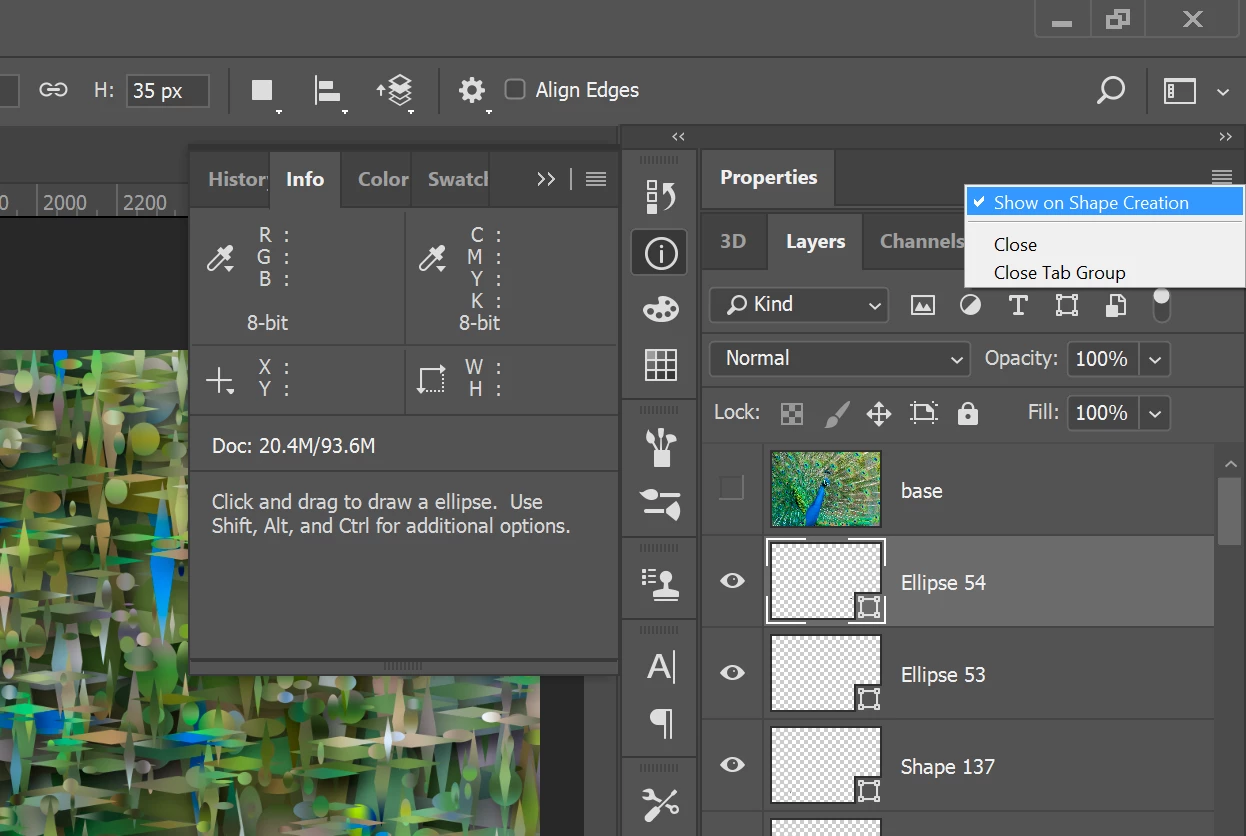
Hi, I use Photoshop CC 2017.0.1 for drawing comics, and I use the vector tools for making my word bubbles. As such, it can be incredibly annoying how every time I make a new vector path, the properties panel pops open. This is especially troublesome when I'm working on my Cintiq Companion which has limited screen space - I don't want to have to close the panel every single time I add a new word bubble or tail or whatever!
I don't remember this happening before CC 2017, so I suspect it's a new "feature" that someone decided to add for "convenience." But all it does is get in the way of my workflow. I've looked around for any way to turn it off but I haven't found anything - does anyone have any ideas? I did find the "auto-show hidden panels" setting but that doesn't seem to have any effect, even after restarting the application.


 AdChoices