
Known Participant
April 13, 2017
Question

Print problem

  • April 13, 2017
  • 1 reply
  • 2284 views

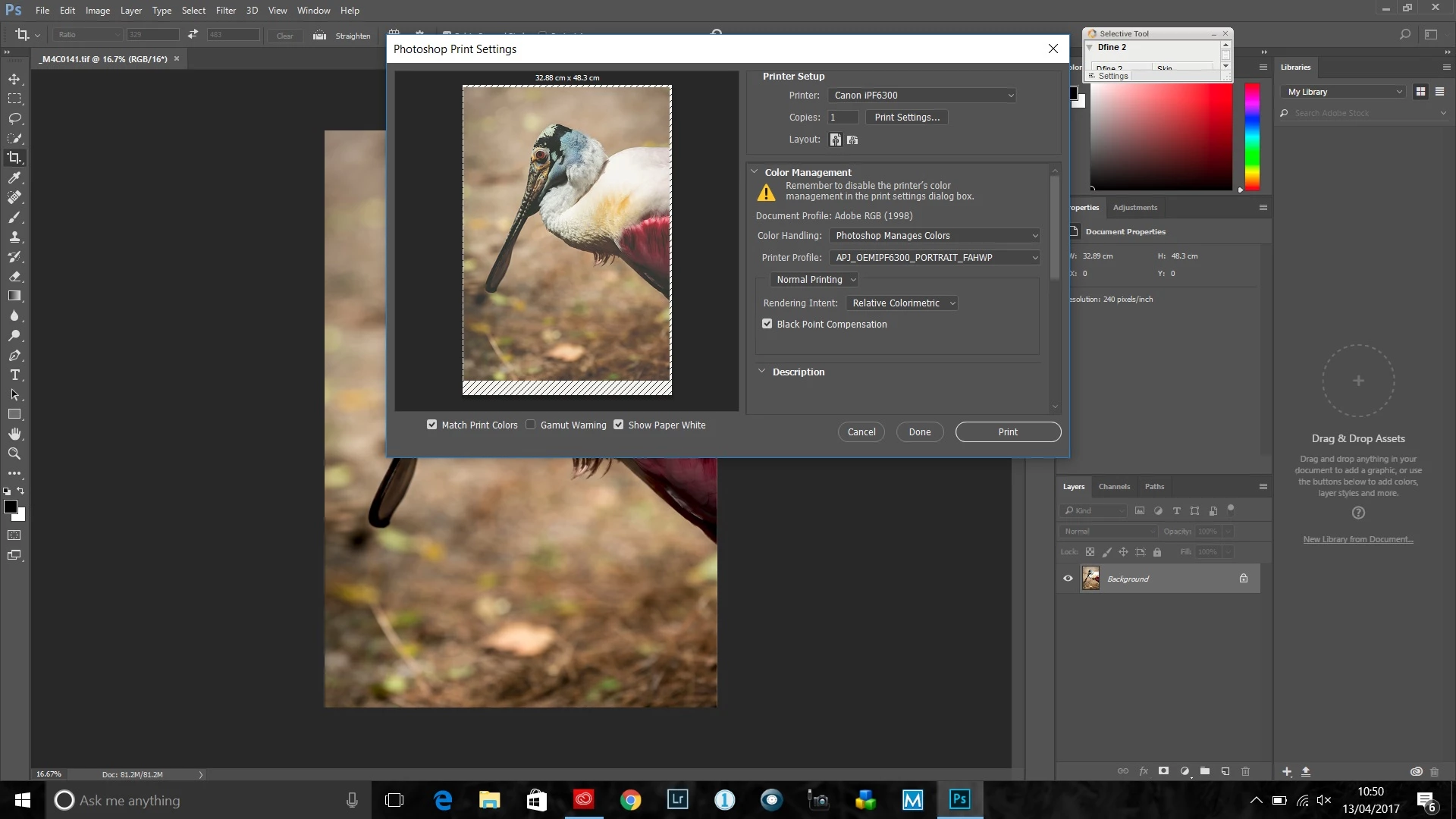
I'm having a problem printing from photoshop latest version. I'm getting diagonal lined borders around the print on the screen with the bottom area being much larger than the top and sides. The printer I am using is a canon ipf 6300. It is ok when using roll paper but problem occrs with any size of sheet. I know it doesn't print borderless on on sheet but I have no option to centralise the print and make the borders all equal.
This topic has been closed for replies.

1 reply

Akash Sharma
Legend
April 13, 2017

Hi ianjaytee,

Please take a look at the steps to troubleshoot mentioned here Troubleshoot Photoshop printing problems and let us know if that helps.

Thanks,

Akash

ianjayteeAuthor
Known Participant
April 18, 2017

Didn't help. Have also spoken to adobe they seem to have no fix

tom attix
Adobe Employee
Adobe Employee
April 18, 2017

The diagonal lines just indicate where the nonprinting area of the paper is (these lines don't show in the print). It's not a bug.

-Tom Attix