Participant
August 2, 2017
Answered

Printing on Photoshop to correct size

  • August 2, 2017
  • 2 replies
  • 861 views

Hello,

I am printing labels and currently using Publisher and it's lacking what I need... I was wondering how would I print to the correct measurements so the prints come out on the labels aligned correctly.

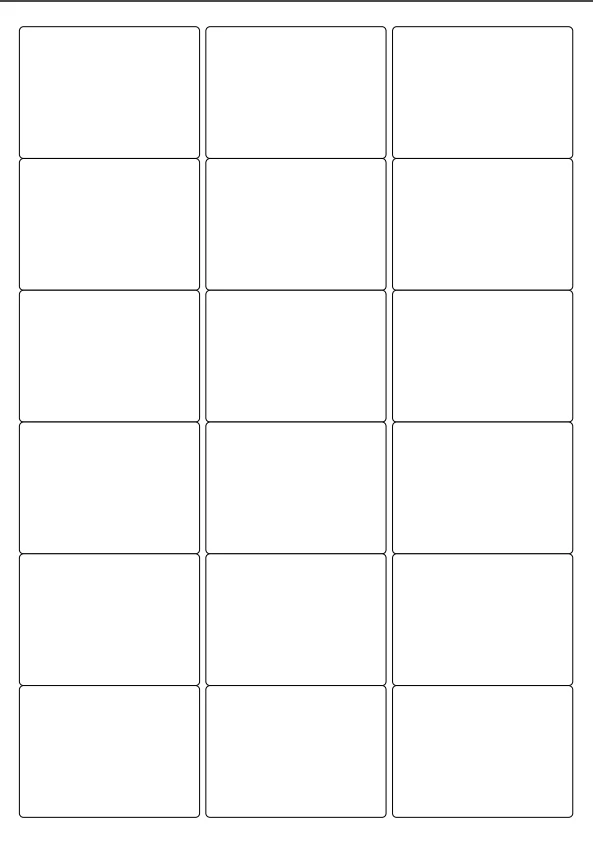
I have been provided with a .pdf with the template for the labels but when I am printing it's completely off allignment.
This topic has been closed for replies.
Correct answer Semaphoric

When you say "Off alignment", is it just offset, or is the size wrong too?

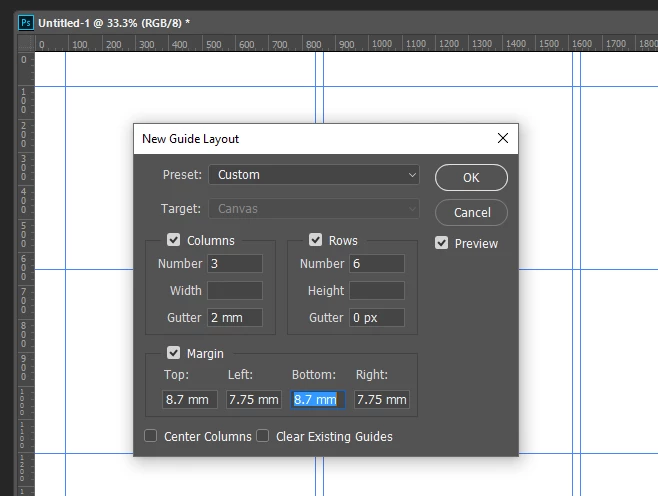
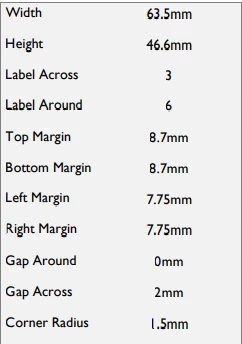
Maybe you could set up a guide layout [from the View menu], like so:


2 replies

Derek Cross
Community Expert
Community Expert
August 2, 2017

Might be easier to use MSWord: Tools > Labels (they have loads of templates to match commercial labels)

Participant
August 3, 2017

Microsoft Word labels are only text, Mine have logos and images on so MSWord is unfortunately not a good option.

Legend
August 3, 2017

Personally I'd still use Word, having designed the graphics in Photoshop. For self-printing I can't see any issue. Work with the strengths of each tool, and goodness knows tabular layout of text isn't a strength of Photoshop.

Semaphoric
Community Expert
SemaphoricCommunity ExpertCorrect answer
Community Expert
August 2, 2017

When you say "Off alignment", is it just offset, or is the size wrong too?

Maybe you could set up a guide layout [from the View menu], like so:


Participant
August 3, 2017

This seems to be the right direction, Thank you I will give it a go now.

Derek Cross
Community Expert
Community Expert
August 3, 2017

Also, have a look at the Avery (Labels) site to see if they have some free software or something.