Participant
October 3, 2025
Answered

Printing out from PS to Epson Stylus Pro 4800. Mac OS Sequoia. Or rather failing.

  • October 3, 2025
  • 5 replies
  • 275 views

Mac Studio with 2 Epson 4800s USB connected directly into the back of the computer. I can print out head cleans etc via the Epson utility, so they're obviously connected, being seen and receiving instructions from the Mac. However, trying to print an image out of Photoshop will not. Keeps saying 'waiting for printer to become available' when there's nothing in the print queue. Deleted the printers & everything to do with them. Reloaded the latest drivers from Epson & endless restarts later, still no joy.

Any ideas anyone? I'm seriously considering wiping the hard drive and giving a completely OS clean install and then adding my apps. Which I'd rather not have to do.

Correct answer NB, colourmanagement

@David Preutz Hi there David, Hope all’s good with you.  Well done keeping 4800's going.

For now, to save on a clean install, you can optionally log into your mac as a guest user, which apparently disables lots of old settings / app preferences, etc. maybe that will make the printer work. I realise it's not a full time solution, though. 


have you tried all this:

On your Mac, choose Apple menu System Preferences, then click Printers & Scanners
Press and hold the Control key as you click in the list at the left, then choose “Reset printing system” from the menu that appears.


After you reset the printing system, the list of printers in Printers & Scanners preferences is empty.
Reinstall the print driver, only from the manufacturer, not Apple.

Also (for both Mac and Win) take a look at the following article and check if that helps: 
https://helpx.adobe.com/photoshop/using/printing-color-management-photoshop1.html

You may like to re-install the printer drivers to check if that makes a difference?

Here is some general Adobe [Mac and Win] info on printing problems,
https://helpx.adobe.com/photoshop/kb/troubleshoot-printing-problems.html
Simple reset for Photoshop printing: hold the space bar when you open the print window. It resets the print dialogs - deleting possibly corrupt print metadata in the file.

- - - - - - - -
If that doesn’t help -
Here is some troubleshooting advice:
https://helpx.adobe.com/photoshop/kb/basic-trouble-shooting-steps.html


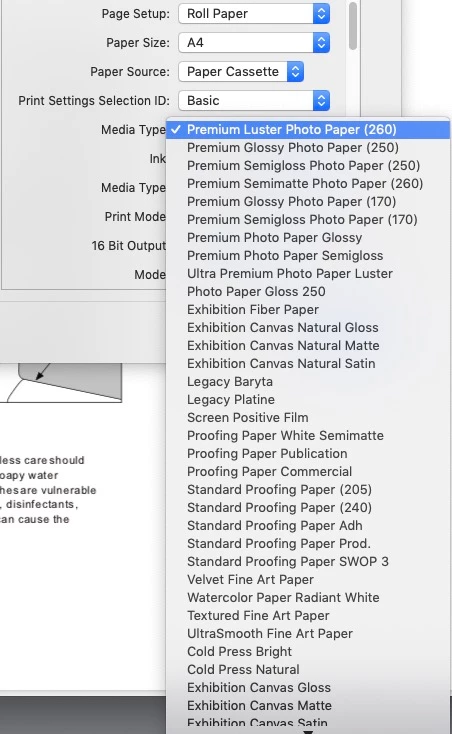
Are you actually using the Epson supplied driver? in many cases users are struggling with the default MacOS driver (one clue is whether you see all the proper Epson media names in print settings. 


Here's an example of what I'd expect to see in an Epson driver under "Media Type" for media name options:


neil barstow - adobe forum volunteer,
colourmanagement consultant & co-author of 'getting colour right'
See my free articles on colour management
Help others by clicking "Correct Answer" if the question is answered.
Found the answer elsewhere? Share it here. "Upvote" is for useful posts


5 replies

NB, colourmanagement
Community Expert
NB, colourmanagementCommunity ExpertCorrect answer
Community Expert
October 6, 2025

@David Preutz Hi there David, Hope all’s good with you.  Well done keeping 4800's going.

For now, to save on a clean install, you can optionally log into your mac as a guest user, which apparently disables lots of old settings / app preferences, etc. maybe that will make the printer work. I realise it's not a full time solution, though. 


have you tried all this:

On your Mac, choose Apple menu System Preferences, then click Printers & Scanners
Press and hold the Control key as you click in the list at the left, then choose “Reset printing system” from the menu that appears.


After you reset the printing system, the list of printers in Printers & Scanners preferences is empty.
Reinstall the print driver, only from the manufacturer, not Apple.

Also (for both Mac and Win) take a look at the following article and check if that helps: 
https://helpx.adobe.com/photoshop/using/printing-color-management-photoshop1.html

You may like to re-install the printer drivers to check if that makes a difference?

Here is some general Adobe [Mac and Win] info on printing problems,
https://helpx.adobe.com/photoshop/kb/troubleshoot-printing-problems.html
Simple reset for Photoshop printing: hold the space bar when you open the print window. It resets the print dialogs - deleting possibly corrupt print metadata in the file.

- - - - - - - -
If that doesn’t help -
Here is some troubleshooting advice:
https://helpx.adobe.com/photoshop/kb/basic-trouble-shooting-steps.html


Are you actually using the Epson supplied driver? in many cases users are struggling with the default MacOS driver (one clue is whether you see all the proper Epson media names in print settings. 


Here's an example of what I'd expect to see in an Epson driver under "Media Type" for media name options:


neil barstow - adobe forum volunteer,
colourmanagement consultant & co-author of 'getting colour right'
See my free articles on colour management
Help others by clicking "Correct Answer" if the question is answered.
Found the answer elsewhere? Share it here. "Upvote" is for useful posts

Participant
October 11, 2025

Hello Neil .. The spacebar trick worked. :-)) 

After which I backed everything up, wiped the HD & ran a clean install of the OS to clean out any hangovers from the migration from my old tin of Guinness runing Mojave. Loaded in the apps off the websites so everything is virginish and now up & running. Although backing up image folders  to a couple of external spinning discs is painfully slow. New ESata to USB C cables plugged directly into the back of the Mac, discs reformatted to APFS & showing no problems on either Disc Utility or TTPro. A Fisher Price turntable could transfer quicker.

NB, colourmanagement
Community Expert
Community Expert
October 20, 2025

@David Preutz Thats good to know. (on printing anyway) 


neil

Legend
October 3, 2025

I'd be interested to know if D Fosse's suggestion works. It's been so tedious to be stuck in the cycle of removing and reinstalling printer files, right, David?


Check out Waiting For Printer To Become Available (5 Fixes)

 https://theflexibleworker.com/waiting-for-printer-to-become-available/

especially the section, Create A New Printer Queue.


Larry
Participant
October 3, 2025

I'll let you know tomorrow as switched it and me off for the night.

D Fosse
Community Expert
Community Expert
October 3, 2025

Hold the spacebar while clicking "print". This clears out any corrupt or non-current print metadata from the file.

Participant
October 3, 2025

Interestingly, I just tried through Affinity Photo and it printed so it would seem there's a possible conflict somewhere between PS v26.10 and either Sequioa or the Epson driver or all 3.

Participant
October 3, 2025

Interestingly, I've just tried through Affinity Photo and it prints. My next question ~ where's the bug Mr Adobe??
