
January 6, 2017
Answered

Printing photo with filename.

  • January 6, 2017
  • 2 replies
  • 13534 views

I'm new to Photoshop. I am trying to print pictures with the filename as a header for work. I have managed to do so, but the header prints out (filename.jpg) @ 16.7% (RGB/8) *. How can I print with just the filename?
    This topic has been closed for replies.
    Correct answer cinziamarotta

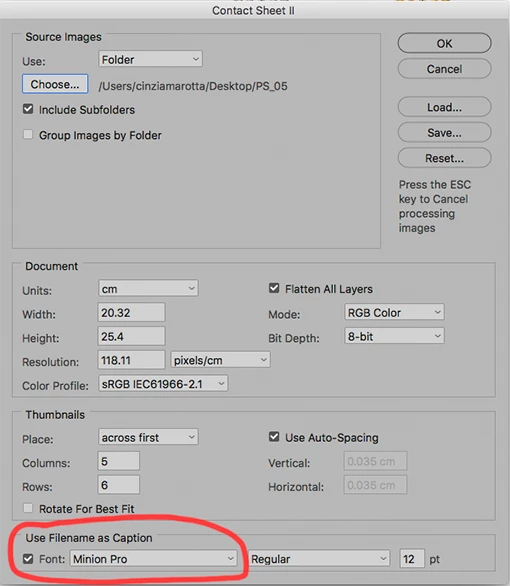
    Generally for this operation I use the Photoshop feature "contact sheet", so I can print an entire folder of images on a sheet by using the file name as caption. Choose: FILE > AUTOMATE > CONTACT SHEET.

    2 replies

    cinziamarotta
    cinziamarottaCorrect answer
    Participating Frequently
    January 6, 2017

    Generally for this operation I use the Photoshop feature "contact sheet", so I can print an entire folder of images on a sheet by using the file name as caption. Choose: FILE > AUTOMATE > CONTACT SHEET.

    January 6, 2017

    That partially worked, but I would prefer to print one picture per page and not all together like that.

    cinziamarotta
    Participating Frequently
    January 6, 2017

    Set columns: 1 and rows: 1. So you will have a photo per page

    JJMack
    Community Expert
    Community Expert
    January 6, 2017

    That sounds more like a screen capture of your Photoshop Image window is being printed.  If you want to add the file name to your image.  You need a Photoshop Script.  To add a text layer containing the Documents File name. on top of the  image or over to a boarer you make by adding canvas..

    JJMack
    January 6, 2017

    Thanks for the input. I am still new to this, so not sure how to do that.