Participant
October 7, 2025
Answered

Problem with font selection. It crashes and the font has no texture.

  • October 7, 2025
  • 1 reply
  • 157 views

Hi, since today I've been getting this error in Photoshop on many of the fonts I downloaded. The font texture has disappeared.
It also freezes for a few seconds when I switch between fonts.

I'm attaching a screenshot. On the left, the characters display correctly in Premiere Pro. On the right, they display correctly in Photoshop.

Correct answer Semaphoric

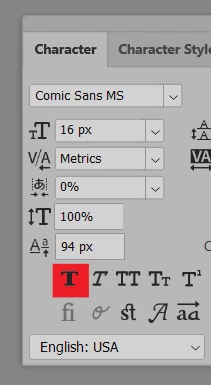
in the Photoshop Character panel, de-select the faux bold icon.


1 reply

Semaphoric
Community Expert
SemaphoricCommunity ExpertCorrect answer
Community Expert
October 7, 2025

in the Photoshop Character panel, de-select the faux bold icon.
 

Participant
October 7, 2025

It worked. Thank you so much for the support
