

mikaels71195823
Inspiring
March 3, 2020
Answered

Problem with Photoshop tools

  • March 3, 2020
  • 4 replies
  • 4531 views

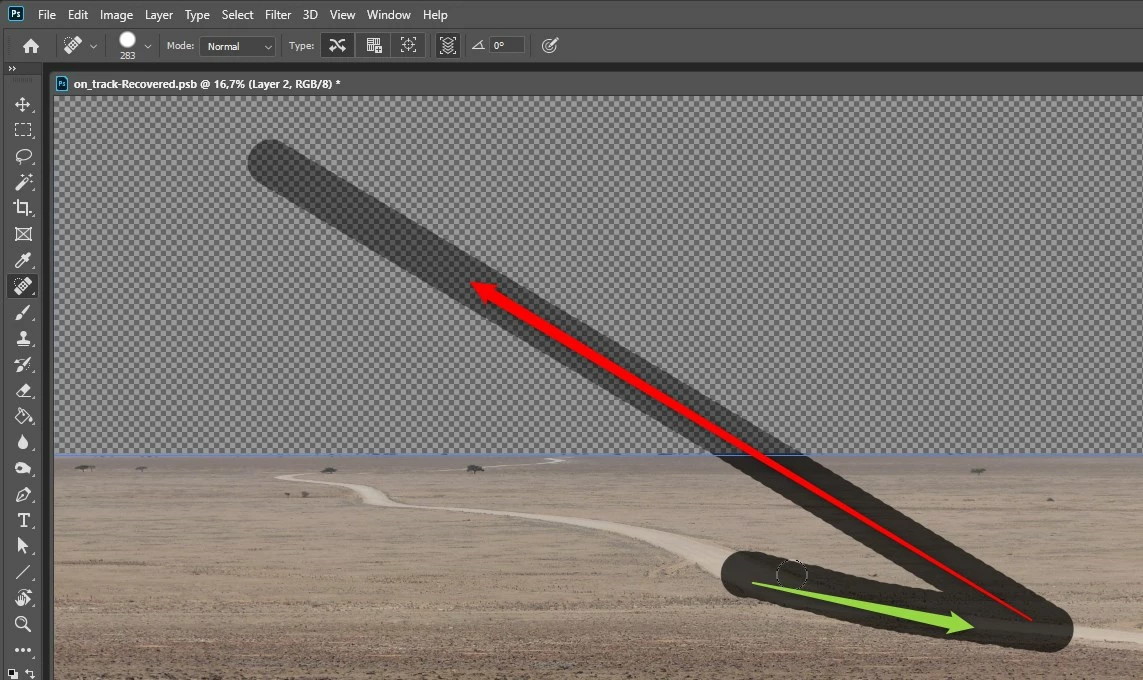
When I use some tools in Photoshop, something strange happens. Here's a screenshot when I use the "Spot healing brush tool". I try to remove the road and i drag it in the direction of the green arrow. When I reelese the mousebutton it automatically draw up and to the left like the red arrow shows.
Why doe's it do so? I have PS version 21.1.0 on a Windows computer, and latest graphiccard drives. The fun part is that it works OK with my wacom pencil but not the mouse.



Correct answer JJMack

That a bug in Windows PS 21.1.0  when Wacom tablets are used.  Backup your Photoshop Preferences the reinstall 21.0.3 for the reinstall of 21.0.3 will reset your Photoshop preferences.

4 replies

Participant
September 24, 2025

can't use the Generate tools


Participant
February 20, 2025

In my Photoshop Software,3D tool is not showing.Please help me

CMass
Community Manager
Community Manager
February 20, 2025

Hi @Jeevankus


Please read more about 3D and Photoshop here:  https://adobe.ly/4gMhZV6

^CM

Participant
September 19, 2024

it is the liquify filter which is not fuctioning


JJMack
Community Expert
JJMackCommunity ExpertCorrect answer
Community Expert
March 3, 2020

That a bug in Windows PS 21.1.0  when Wacom tablets are used.  Backup your Photoshop Preferences the reinstall 21.0.3 for the reinstall of 21.0.3 will reset your Photoshop preferences.

JJMack
mikaels71195823
Inspiring
March 3, 2020

OK, shall I keep the version 21.0.3 or update to the latest again? Where do I find my Preferences?

Best regards: Micke Seise
Just Shoot Me
Legend
March 3, 2020

I would think Keep the older version installed until the bug is fixed in the newer version.