EMastermind
Participating Frequently
November 28, 2017
Question

Problem with Rectangular marquee tool

  • November 28, 2017
  • 1 reply
  • 1394 views

Hi.

As I select an area of the image and move the selection, this is what happens:
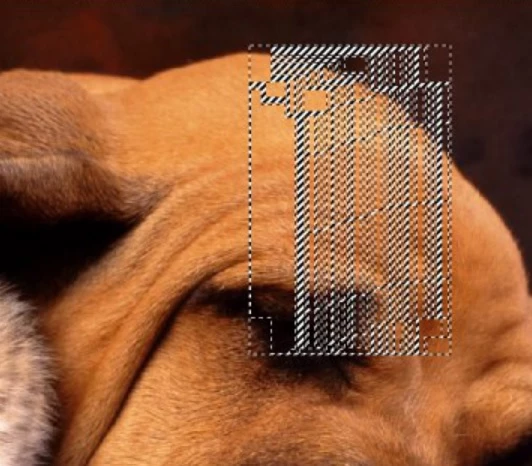
Please help me. what is the problem?

This topic has been closed for replies.

1 reply

c.pfaffenbichler
Community Expert
Community Expert
November 28, 2017

Please post a screenshot that includes the pertinent UI elements (Layers Panel, Options Bar, …).

Does turning off »Use Graphics Processor« in the Performance Preferences (Photoshop > Preferences > Performance > Graphic Processor Settings) and restarting Photoshop have any bearing on the issue?

What have you done for trouble-shooting so far?

Restoring Preferences after making sure all customized presets like Actions, Patterns, Brushes etc. have been saved might be a good starting point:

https://helpx.adobe.com/photoshop/kb/basic-trouble-shooting-steps.html

EMastermind
Participating Frequently
November 28, 2017

I don't think I've done any reset preferences...

This is the full image:

Jeff Arola
Community Expert
Community Expert
November 28, 2017

What version of photoshop are you using?

Help>System Info from within photoshop and the top line is the Photoshop Version.

I seem to remember a photoshop cc version that had that issue, maybe 2014 and an dot release update fixed it.