March 24, 2019
Question

problem with the eyedropper tool
  • March 24, 2019
  • 2 replies
  • 1114 views

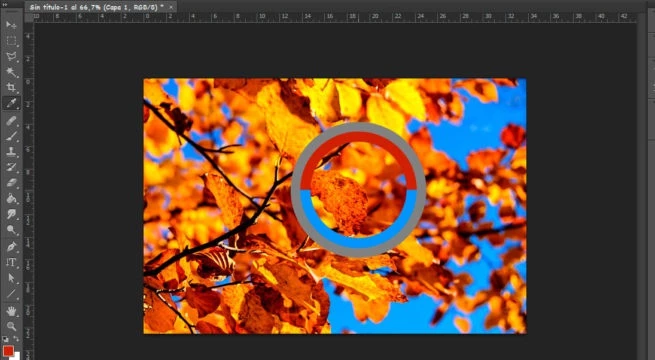
I do not see the circle of the tool, help!

This topic has been closed for replies.

2 replies

JJMack
Community Expert
Community Expert
March 24, 2019

It looks like you are using Photoshop on Windows and using Photoshop's eyedropper tool and the Cursor and  eyedropper or cross hairs is not displaying. Is Adobe Photoshop having problems hanging other Tool mouse cursor?

JJMack
Norman Sanders
Legend
March 24, 2019

The Eyedropper tool does not present as a circle. Try the Color Sampler Tool which shows up this way after a click and its values are displayed in the Info Panel.

The Color Sampler tool is nested with the Eyedropper in the Tools panel

The Eyedropper deposits a sample swatch of the color in the Foreground patch of Foreground/Background of the Tools panel. Its value is shown in info panel when the Eyedropper is resting on it.

If, on the other hand, you are referring to the Sample Ring, checkmark "Show Sample Ring" in the Eyedropper Options bar.

JJMack
Community Expert
Community Expert
March 24, 2019

When you use the eyedropper tool and click the mouse button that ring shoul show however, the Eyedropper cursor should also show  the cursor can not be captured on windows so I do not know if there cursor is showing or not.   The color sampler tool does not show the ring it  just marks the sopt like you show.

JJMack