Participant
July 1, 2026
Answered

Problème : impossibilité de superposer grâce à l'outil "incrustation"

  • July 1, 2026
  • 4 replies
  • 73 views

Bonjour,
Je fais un peu de photo astro, et pour traiter mon image sur photoshop, il me faut superposer 2 calques.

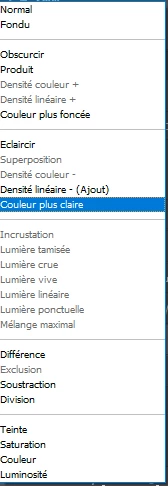
Quand je créer les 2 calques différents et que je souhaite les superposer, la fonction “incrustation n’est pas disponible (vois pj)

Je suis sur la version photoshop de 2023, quelqu’un aurait il déjà rencontrer ce problème ou pourrait m’aider à le résoudre ?
Bonne soirée

Pilou


PS : en pj ce trouve une photo de mes calques et le menu déroulant me permettant de choisir le mode de superposition, je travaille avec 2 calques, l’image d’origine ainsi qu’une copie de cette image avec un filtre “passe-haut” régler à 1,6 pixels
 

    Correct answer davescm

    @PilouElite It looks like you may be working in 32 bits/channel mode. Blending modes are restricted in that mode and ‘Overlay’ is unavailable. To see the full range of blending modes you would need to work in 16 or 8 bits/channel.

    As for arrange, it requires an area that is the same in both images. Unfortunately star fields look similar to noise and are unlikely to be recognised by the software. In that case, manual alignment may be required.

    Dave  

    4 replies

    davescm
    Community Expert
    davescmCommunity ExpertCorrect answer
    Community Expert
    July 7, 2026

    @PilouElite It looks like you may be working in 32 bits/channel mode. Blending modes are restricted in that mode and ‘Overlay’ is unavailable. To see the full range of blending modes you would need to work in 16 or 8 bits/channel.

    As for arrange, it requires an area that is the same in both images. Unfortunately star fields look similar to noise and are unlikely to be recognised by the software. In that case, manual alignment may be required.

    Dave  

    Participant
    July 9, 2026

    J’ai converti mon image en 16bits et en effet, c’était bien le problème !
    Tout fonctionne à présent !
    Je vous remercie à tous pour votre aide !

    Trevor.Dennis
    Community Expert
    Community Expert
    July 7, 2026


    OK, I can see we had an issue with the translation.  I read ‘Overlay’ as overlaying one layer above an another.  I think you were actually referring to the ‘Overlay’ blend mode.  In fact you are describing the high pass filter as a sharpening method.  You need to

    Open your star image

    Copy the background layer (Ctrl J)

    Go Filter > Other > High Pass

    Use a value around 2.0 and press OK

    Set the layer’s Blend Mode to Overlay.


    The layers will look like this. Note my green highlight.  Use the drop-down arrow and change it from Normal to Overlay. You can try other blend modes like Hard Light and Vivid Light.


    I have uploaded the result as a GIF so you can see the before and after


    I used a value of 2.0 in High Pass.  The higher the value, the more the sharpening effect.

    Good luck, and let us know how you get on.


    Participant
    July 9, 2026

    Merci !


    Trevor.Dennis
    Community Expert
    Community Expert
    July 1, 2026

    You probably need to be more precise about how you ‘overlay’ the layers.  A common method is to select all of the layers and go Edit > Auto Align Layers sometimes followed by Edit > Auto Blend Layers using seamless tones and colors.   

    A lot of Photoshop’s menus are contextual, and do not show options that would not work under the current settings.  Select both layers and see if this helps.


    Participant
    July 2, 2026

    Bonsoir, je vous remercie pour votre réponse.
    J’ai essayé vos recommandations et j’ai rencontré 2 problèmes :

    1. En essayant d’aligner mes calques (celui d’origine + celui avec le filtre “passe-haut”) le logiciel me dit qu’il est impossible car les images ne se chevauchent pas suffisamment (message d’erreur ci-joint)
    1.  J’ai tout de même essayer sans filtre “passe haut” sur le second calque et après avoir aligné puis fusionné les calques, j’étais toujours dans l’impossibilité de superposer le calque d’origine au second calque voire même au nouveau calque créé (le calque fusionné

    Je me demanderai presque si ce n’est pas un problème de mon logiciel.
    Si vous avez des questions sur mon problème n’hésitez pas !
    PilouElite

    Trevor.Dennis
    Community Expert
    Community Expert
    July 1, 2026

    I’m not seeing an attachment.  You can paste screen shots directly into your post, and this is the preferred method as a lot of people are reluctant to open files from people they don’t know.

    [OK seeing it now. It was just slow to load]